 TutorialKart.com
Define House Bank in SAP FICO for a Company Code
A house bank in SAP is the bank used by a company code for outgoing payments, incoming collections, bank statement processing, and other treasury or bank accounting activities. Each house bank is created for a specific company code in SAP and is identified by a house bank key. Under the house bank, you maintain one or more account IDs to represent the actual bank accounts used for different currencies, payment methods, or business purposes.
In SAP FICO, the house bank stores bank-level details such as bank country, bank key, address, and communication information. The account ID stores account-level details such as bank account number, currency, general ledger account assignment, and descriptive text. This separation helps SAP determine the correct bank account during automatic payment processing, manual payments, electronic bank statements, and bank reconciliation.
Purpose of House Bank and Account ID Configuration in SAP FICO
In this configuration activity, you define house banks and account IDs for an organization as per business requirements. In SAP, a house bank contains the bank master reference, communication details, and related bank account information needed for payment and bank accounting processes.
- Use a house bank to identify the bank used by the company code.
- Use an account ID to identify a specific account maintained under that house bank.
- Use house bank and account ID combinations in payment programs, payment methods, bank determination, and bank statement processing.
- Maintain different account IDs when the same bank has multiple accounts for different currencies or purposes.
House Bank, Bank Key, and Account ID Difference in SAP
| Term | Meaning in SAP FICO | Example Use |
|---|---|---|
| House Bank | A bank maintained for a company code and used for payment transactions. | HDFC, CITI, SBI1 |
| Bank Key | The key that identifies the bank master record. In many countries it is based on a bank number, routing number, sort code, or similar bank identifier. | Country-specific bank identifier |
| Account ID | A key that identifies a specific bank account under a house bank. | CURR, MAIN, USD1, INR1 |
For example, one company code can have house bank HDFC. Under that house bank, you can create account ID MAIN for the main current account and account ID PAYR for a payment account. This structure lets SAP select the correct bank account based on the configuration used in payments and bank accounting.
Navigation Path and Transaction Code FI12 for House Bank in SAP
You can create or define house bank in SAP FICO by using transaction code FI12 or by following the IMG menu path. In SAP S/4HANA projects, bank account management may also be handled through bank account apps or related configuration, depending on the system design and activated scope. However, the basic FI12 configuration concept of house bank and account ID remains important for understanding SAP bank accounting.
| SAP R/3 Role Menu | Define House Banks |
| Transaction code | FI12 |
| SAP Menu Path | SPRO > Implementation Guide for R/3 Customizing (IMG) > Financial Accounting (New) > Bank Accounting > Bank Accounts > Define House Banks |
Prerequisites Before Creating a House Bank in SAP FICO
Before defining a house bank in SAP, keep the required bank and accounting details ready. Missing or incorrect details can affect payment processing, bank statement upload, and reconciliation later.
- Company code for which the house bank is being created.
- Bank country and bank key of the bank master record.
- House bank key to be used in SAP, usually up to five characters depending on system settings.
- Bank account number, account currency, and description for the account ID.
- General ledger account assignment for the bank account, if required in your configuration screen or related account setup.
- Communication details such as telephone number and contact person, if maintained by the project.
House Bank Configuration Steps in SAP FICO Using FI12
Step 1: Enter SAP transaction code FI12 in the command field and press Enter to continue.

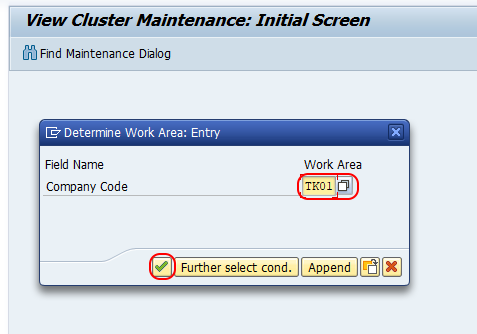
Step 2: On the Determine Work Area entry screen, update the company code for which you are going to create house banks in SAP.
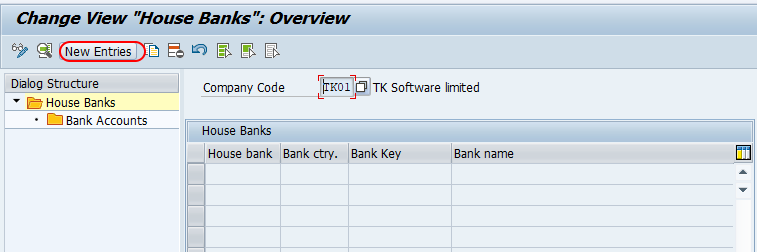
Step 3: On the Change View House Banks overview screen, click the New Entries button to create a new house bank in SAP.
Step 4: On the New Entries House Bank screen, update the following details.
- House Bank: Enter the key that identifies the house bank in SAP FICO. Use a meaningful short key so users can recognize the bank during payment and bank accounting activities.
House Bank Data
- Bank Country: Update the bank country key, for example IN for India.
- Bank Key: Update the bank key that identifies the bank master record. The format of the bank key depends on the country-specific bank setup.
Communication Data
- Telephone 1: Update the contact number, if required.
- Contact Person: Enter the responsible person name for bank-related contact.
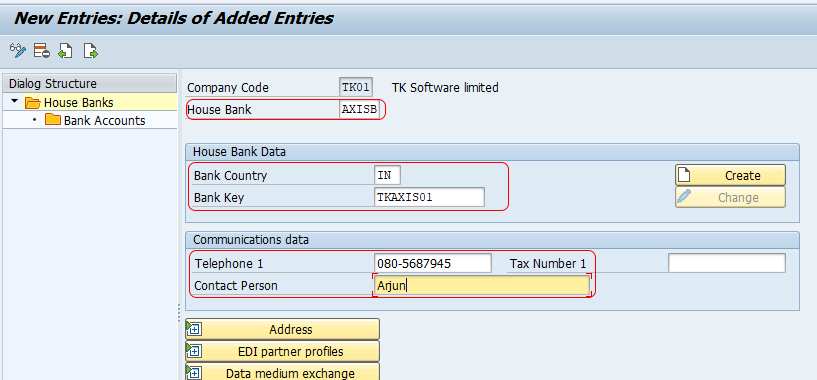
After updating all the required details, click the Save button and save the configured house bank details. The system may ask for a customizing request, depending on your SAP client and transport settings.
Create Bank Account ID in SAP Under the House Bank
After successfully creating the house bank in SAP, configure the account ID. The account ID is required because the house bank only identifies the bank, while the account ID identifies the actual bank account used for transactions.
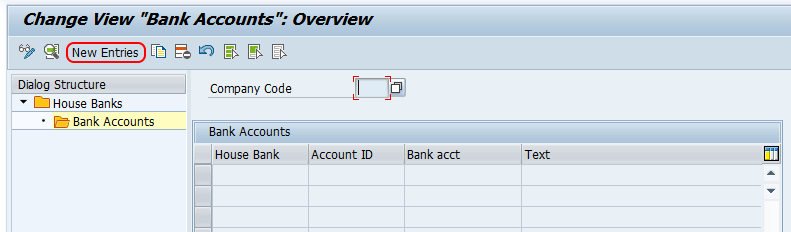
Double click on the Bank Accounts option which is under House Banks.
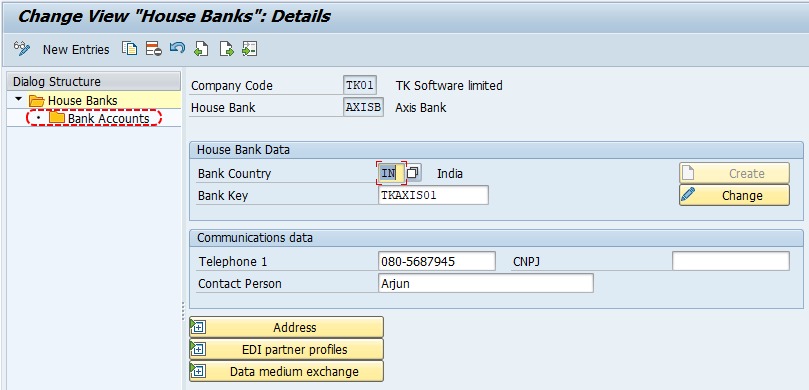
On the Change View Bank Accounts overview screen, click the New Entries button to create bank account details.
On the Change View Bank Accounts details overview screen, update the following details.
- Account ID: Update the key that identifies the house bank account ID in SAP.
- Description: Update a clear descriptive text for the account ID.
- Bank Account Number: Update the account number of the bank.
- Alternative Account Number: Update an alternative bank account number if required by the business or country-specific setup.
- Currency: Maintain the currency of the bank account.
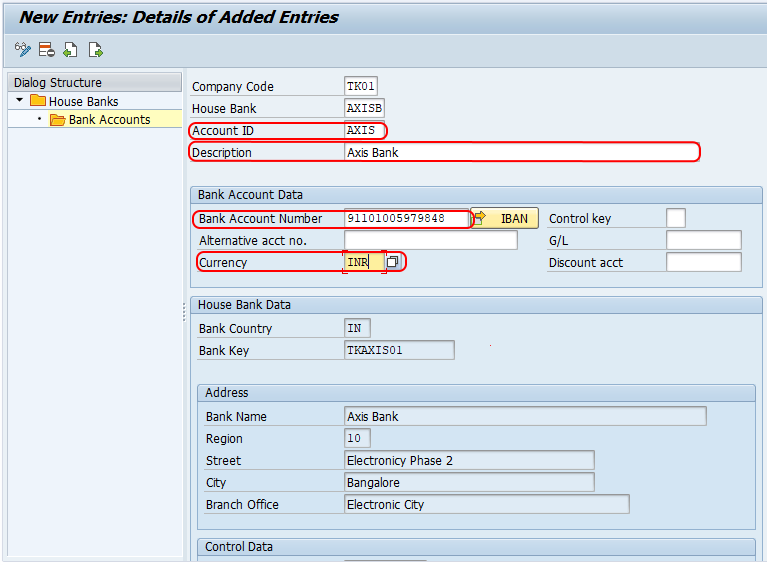
Click Save after maintaining the account ID details. Once saved, the house bank and account ID combination can be used in relevant SAP FICO payment and bank accounting configuration.
Where House Bank and Account ID Are Used in SAP FICO
House bank and account ID configuration is used in several SAP FICO processes. The exact usage depends on the project design, payment methods, and bank integration setup.
- Automatic Payment Program: SAP uses bank determination settings to select a suitable house bank and account ID for payments.
- Manual outgoing payments: Users may select the house bank and account ID while posting or processing payments.
- Electronic Bank Statement: Bank statement processing uses bank account information to identify the correct bank G/L account and statement account.
- Check management: House bank and account ID can be relevant when check lots and payment forms are configured.
- Bank reconciliation: Correct bank account assignment helps match bank postings with the proper bank G/L accounts.
House Bank Setup Checklist for SAP FICO Review
- Confirm that the house bank is created under the correct company code.
- Check that the bank country and bank key match the bank master record.
- Verify that the account ID represents the correct bank account number and currency.
- Use naming conventions that make house bank and account ID values easy to identify.
- Confirm related payment method and bank determination settings before testing payments.
- Check electronic bank statement settings if the bank account will be used for statement uploads.
Common Issues While Defining House Bank in SAP
- Wrong company code selected: House banks are maintained by company code, so selecting the wrong work area creates configuration in the wrong place.
- Invalid bank key: If the bank key is incorrect or missing, verify the bank master record before saving the house bank.
- Account ID not maintained: Creating only the house bank is not enough for most payment processes; maintain the bank account ID as well.
- Currency mismatch: The account currency should match the business use of the bank account.
- Payment program not selecting bank: Check bank determination and payment method settings in addition to the house bank master data.
FAQs on House Bank and Account ID in SAP
How do you define a house bank in SAP?
You can define a house bank in SAP by using transaction code FI12 or the IMG path for Define House Banks. Enter the company code, create a new house bank key, maintain bank country and bank key, add communication details if required, and save the configuration.
What is the transaction code for house bank in SAP?
The commonly used transaction code for defining a house bank in SAP FICO is FI12. Depending on the SAP version and S/4HANA configuration approach, related bank account maintenance may also be handled through additional apps or configuration transactions.
What is the difference between house bank and account ID in SAP?
A house bank identifies the bank used by a company code. An account ID identifies a specific bank account under that house bank. One house bank can have multiple account IDs for different accounts, currencies, or payment purposes.
Is account ID mandatory after creating a house bank in SAP?
For most payment and bank accounting processes, the account ID is required because SAP must know the exact bank account to use. Creating the house bank alone identifies the bank, but not the specific account.
What is FF_5 used for in SAP bank accounting?
Transaction code FF_5 is commonly used for importing electronic bank statements in SAP. House bank and account ID configuration helps SAP identify the relevant bank account during bank statement processing.
Successfully, we have created a house bank and account ID in SAP FICO. Continue reading free SAP FICO tutorials with real-time configuration scenarios.