 TutorialKart.com
In this SAP FICO tutorial, you will learn how to define tolerance groups for G/L accounts in SAP by using transaction code OBA0. A G/L account tolerance group controls the permitted debit and credit clearing differences for G/L open item clearing in a company code. It is maintained in local currency and helps the SAP system decide whether a small payment or clearing difference can be posted automatically or must be reviewed.
This configuration is normally used together with open item managed G/L accounts and payment difference processing. In the previous SAP FI configuration lesson, you learned how to define field status variants and field status groups in SAP.
What are tolerance groups for G/L accounts in SAP?
Tolerance groups for G/L accounts in SAP define the maximum difference that the system may accept while clearing open items for G/L accounts. The limit can be entered as an absolute amount, a percentage, or both. Separate limits are available for debit postings and credit postings.
In real time business scenario, tolerance groups allows the SAP system to process and post the transactions beyond the tolerance groups limits. Tolerances are referred as payment differences, it can be a amount tolerance, percentage tolerance, and debit & credit tolerance.
For example, if a clearing difference is within the amount and percentage limit defined for the G/L tolerance group, the system can allow the difference based on the related clearing configuration. If the difference exceeds the maintained limit, the user must correct the open items or investigate the difference before posting.
Where G/L account tolerance groups are used in SAP FI clearing
G/L account tolerance groups are relevant when SAP FI processes open item clearing and payment differences for general ledger accounts. They are not the same as employee tolerance groups. G/L tolerance groups control limits at the G/L account level, while employee tolerance groups control what an accounting user is allowed to post or clear.
| Configuration area | Transaction code | Purpose |
|---|---|---|
| G/L account tolerance group | OBA0 | Defines debit and credit difference limits for G/L accounts in a company code. |
| Employee tolerance group | OBA4 | Defines posting and payment difference limits for users or accounting employees. |
| Open and close posting periods | OB52 | Controls whether postings are allowed for a company code period. |
For SAP S/4HANA and SAP ERP systems, the exact screen labels may vary slightly by release and configuration, but the accounting concept remains the same: tolerance groups define permitted limits for small differences during financial accounting processing.
Before defining G/L tolerance groups in transaction OBA0
Check the following points before maintaining tolerance groups for G/L accounts in SAP:
- The company code is already created and assigned to the relevant chart of accounts.
- The G/L accounts that require open item clearing are created in the company code.
- The business has confirmed the acceptable amount and percentage limits for debit and credit differences.
- The difference posting accounts and open item clearing process are configured as required for your SAP FI design.
- You have authorization to maintain SAP FI customizing in the implementation guide.
Related SAP FI configuration tutorials
Also Read: –
How to define tolerance groups for employees.
How to create retained earnings account in SAP
How to define open and close posting periods in SAP
You can also refer to SAP Learning content on managing payment differences in SAP S/4HANA for the official training context around payment difference tolerances.
OBA0 transaction code and IMG path for G/L account tolerance groups
You can maintain tolerance groups for G/L accounts by using one of the following navigation method.
Define tolerance groups for G/L accounts in SAP using OBA0
Step 1) Enter T-Code “OBA0” in the SAP command field and enter.

Step 2) On change view “Tolerance for Groups of G/L accounts in Local currency” screen click on new entries button to define the tolerance groups as per company requirements.

Step 3) On new entries screen, update the following details.
- Company Code: – Enter the company code “TK01”.
- Tolerance group: – Keep it as blank.
- Description: – Update the descriptive text of tolerance group for G/L Accounts (Tolerance group for TK01).
- Debit Posting: – Give 0 for debit posting and percentage.
- Credit Posting: – Give 0 for credit posting and percentage.
In many SAP FI configurations, a blank tolerance group is used as the default tolerance setting for the company code. If your organization uses multiple tolerance groups, create a meaningful tolerance group key and assign it according to your G/L account design. Use 0 only when the business requires no automatic difference tolerance for debit or credit postings.
Fields in the SAP G/L tolerance group screen
| Field | How to maintain it | What it controls |
|---|---|---|
| Company Code | Enter the company code such as TK01. | Applies the tolerance limits to that company code. |
| Tolerance Group | Keep blank for the default group or enter a short group key. | Identifies the G/L account tolerance setting. |
| Description | Enter a clear description such as Tolerance group for TK01. | Helps users understand the purpose of the tolerance group. |
| Debit Posting Amount / Percent | Enter the permitted debit-side amount and percentage. | Controls allowed debit clearing differences. |
| Credit Posting Amount / Percent | Enter the permitted credit-side amount and percentage. | Controls allowed credit clearing differences. |
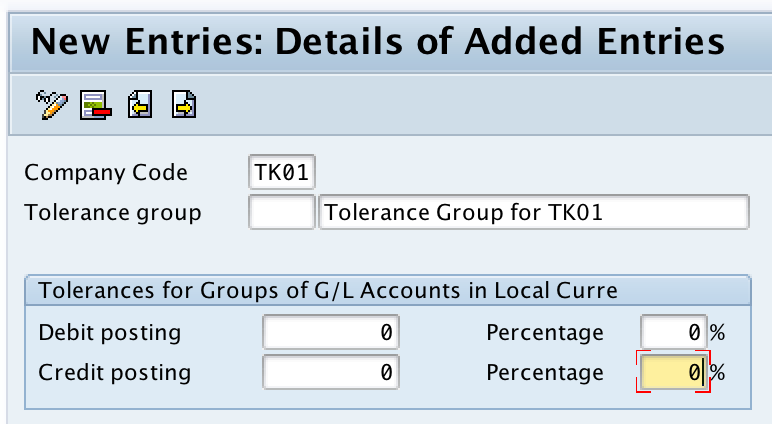
Step 4) Click on save button and save the configured tolerance groups details.

Successfully we have defined tolerance groups for G/L accounts in SAP.
How to choose debit and credit limits for SAP G/L tolerance groups
The tolerance amount should be based on the business rule for acceptable clearing differences. A very low tolerance prevents automatic difference postings and increases manual review. A very high tolerance can allow differences that should be investigated. For this reason, most companies keep G/L tolerance limits conservative and review them with the finance control team.
- Use separate debit and credit limits when the business wants different controls for underpayments and overpayments.
- Use percentage limits when the allowed difference depends on the size of the open item.
- Use amount limits when the business wants a fixed maximum difference in local currency.
- Use both amount and percentage limits when both checks are required by the company’s accounting policy.
G/L tolerance group QA checklist before moving SAP configuration
- Confirm that the company code in OBA0 is correct and matches the target SAP FI configuration.
- Check whether the blank tolerance group is intended to be the default setting for the company code.
- Verify that debit posting and credit posting limits are entered in local currency and match the approved business rule.
- Test an open item clearing example where the difference is within the tolerance limit.
- Test another clearing example where the difference exceeds the tolerance limit and confirm that SAP blocks or requires correction as expected.
- Document the tolerance group key, description, limits, and reason for the configuration before moving the transport.
Common issues in SAP G/L tolerance group configuration
| Issue | Likely reason | What to check |
|---|---|---|
| Difference is not accepted during clearing | The amount or percentage exceeds the G/L tolerance group limit. | Review the OBA0 debit and credit limits and compare them with the clearing difference. |
| User still cannot post even though G/L tolerance is maintained | Employee tolerance group or posting period settings may restrict the posting. | Check employee tolerance group settings, user assignment, and posting period status. |
| Wrong tolerance applies | The default blank group or a specific tolerance group was not planned correctly. | Review the company code tolerance group design and the relevant G/L account settings. |
| Configuration works in one company code but not another | OBA0 is maintained by company code. | Maintain or compare the tolerance group entry for the affected company code. |
FAQs on SAP G/L account tolerance groups and OBA0
What is a tolerance group in SAP FI?
A tolerance group in SAP FI defines permitted limits for accounting postings or clearing differences. For G/L accounts, the tolerance group maintained in OBA0 controls debit and credit difference limits during G/L open item clearing.
What is the transaction code for tolerance groups for G/L accounts?
The transaction code for defining tolerance groups for G/L accounts is OBA0. You can also access it through SPRO under Financial Accounting > G/L Accounting (New) > Business Transactions > Open Item Clearing > Clearing Differences.
What is the transaction code for tolerance groups for users in SAP?
The transaction code for tolerance groups for users or employees is OBA4. This is different from OBA0. OBA4 controls user-level posting and payment difference limits, while OBA0 controls G/L account-level tolerance limits.
Why is the tolerance group kept blank in OBA0?
A blank tolerance group is commonly maintained as the default tolerance group for a company code. It applies when no specific G/L tolerance group is used in the design. If the business needs different limits for different accounts, named tolerance groups can be created.
Should debit and credit tolerance limits always be zero?
No. Zero means no permitted automatic difference for that side of posting. Some companies use zero for strict control, while others maintain small amount or percentage limits for approved clearing differences. The correct value depends on the company’s accounting policy.