 TutorialKart.com
How to assign company code to financial management area in SAP
In this SAP tutorials, you will learn how to assign company code to financial management area in SAP. After configuration of FM area in SAP, you need to assign company code to FM area. The link between company code and financial management area is established through the assignment.
The FM area assignment is used when Funds Management or Public Sector Management processes need to derive the correct financial management area from a company code. In simple terms, it tells SAP which FM area should be used for postings, budget control, and related funds management settings for a particular company code.
When company code to FM area assignment is required in SAP
You assign a company code to a financial management area after the FM area is created and before you test Funds Management postings for that company code. This step is normally completed during enterprise structure assignment, along with other organizational assignments such as company code to controlling area or company code to fiscal year variant, depending on the project design.
- The company code must already exist in SAP.
- The financial management area key must already be maintained.
- The assignment should match the design agreed for Funds Management reporting and budget control.
- In most implementations, this configuration is transported from a development client to quality and production systems.
Configuration path for assigning company code to financial management area
You can assign company code to FM area by using the following navigation path method.
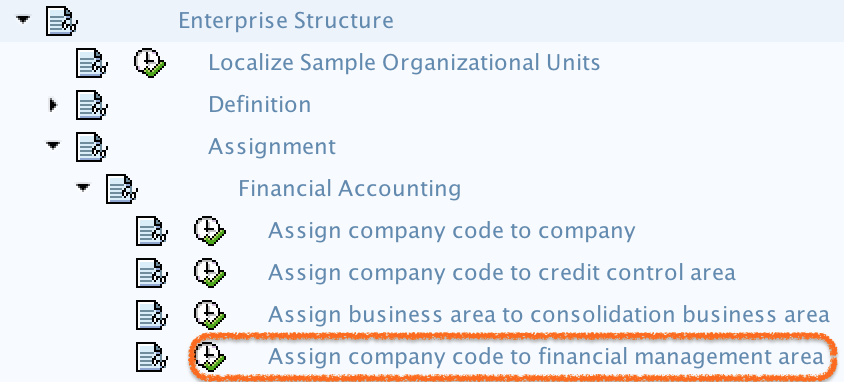
Navigation: – SPRO – IMG – Enterprise Structure – Assignment – Financial Accounting – Assign company code to financial management area.
The IMG activity opens the assignment view where the company code is maintained against the required FM area. The important field in this activity is the FM area key. Make sure you enter the correct key because this assignment influences Funds Management derivation for the company code.
SAP steps to assign company code to financial management area
Step 1) Enter Transaction code “SPRO” in the sap command field and enter to continue.

Step 2) On customizing execute project, select “SAP Reference IMG“

Step 3) On display IMG screen, follow the path and click on “Assign company code to financial management area”
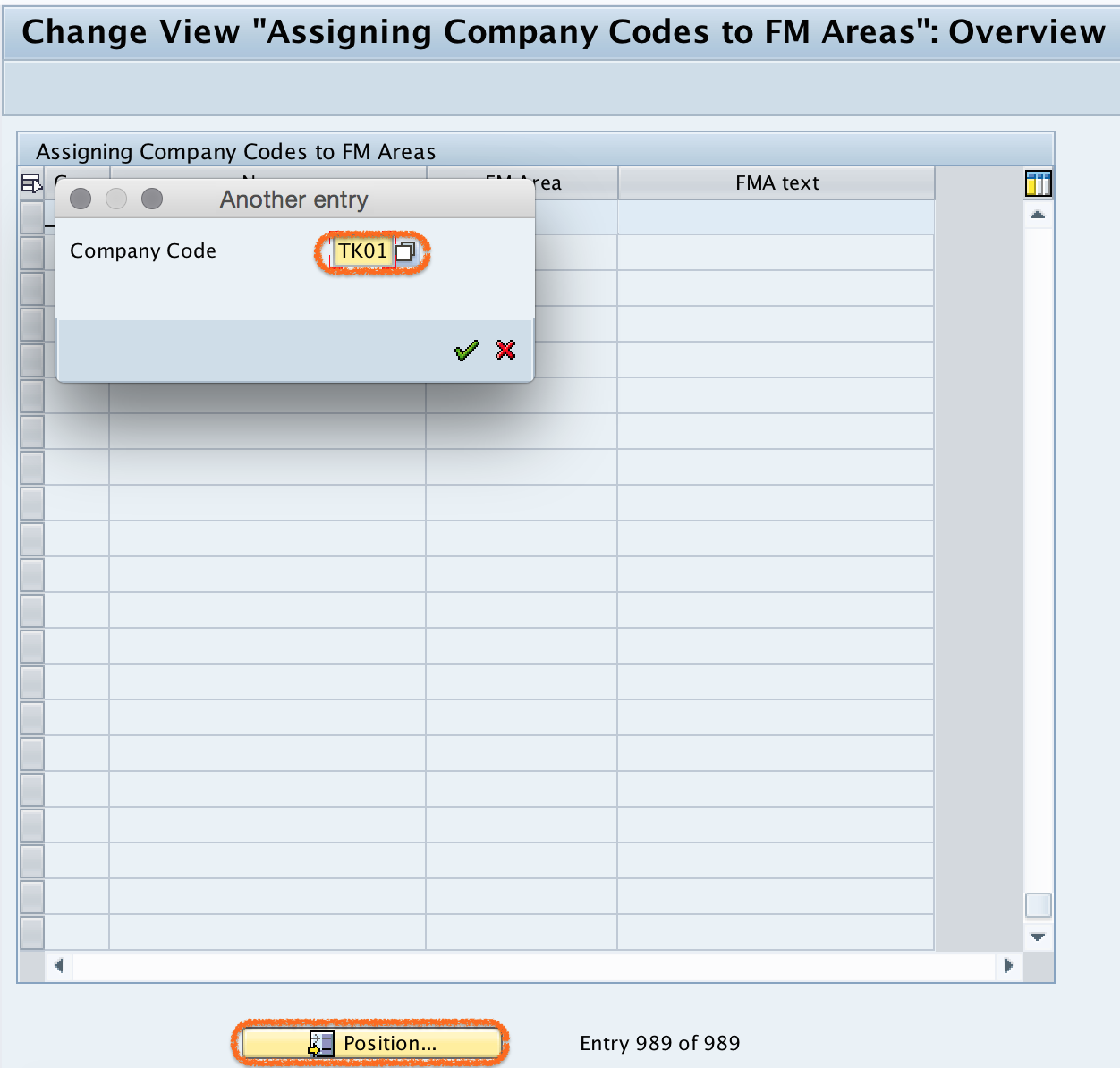
Step 4) On change view “Assigning company codes to FM areas“: overview screen, click on position button and enter you company code in the entry field and press enter. Now your company code display in the top of screen.
Step 5) Now assign FM area by updating the Financial management area key in the given field FM area.
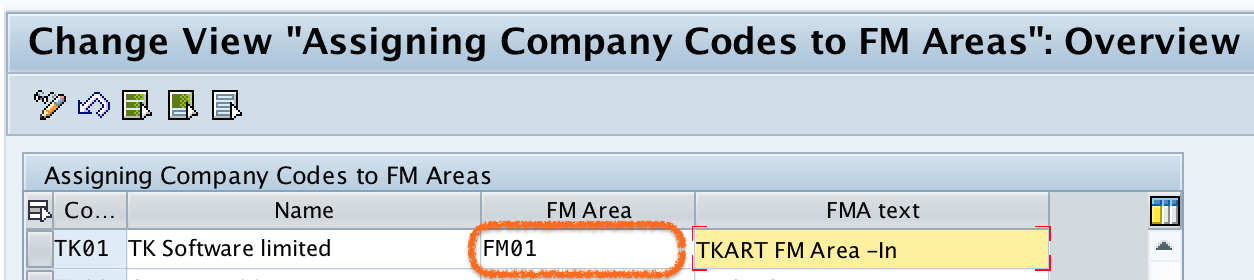
Step 6) After updating the details, click on save button and save the configured details.

Successfully we have assigned company code to financial management area in SAP FICO.
Fields to check before saving the FM area assignment
Before you save the configuration, verify the company code and FM area values carefully. A wrong assignment can cause Funds Management documents, derivation rules, or budget checks to point to an unexpected FM area.
| Field | What to verify |
|---|---|
| Company Code | Check that the company code belongs to the legal entity or accounting unit for which Funds Management is being configured. |
| FM Area | Check that the financial management area key is the correct FM area for the company code. |
| Customizing request | Save the change in the correct transport request when the system prompts for it. |
| Related FI settings | Confirm that other required enterprise structure assignments, such as company code to controlling area, are consistent with the project design. |
Common mistakes in company code to financial management area assignment
- Using the wrong FM area key: Always confirm the FM area key before saving, especially in systems with multiple FM areas.
- Trying to assign before maintaining the FM area: The FM area should be created first, and only then assigned to the company code.
- Confusing FM area with fiscal year variant: OB37 is used for assigning company code to fiscal year variant, not for assigning company code to financial management area.
- Ignoring transport management: In a customizing client, save the assignment in the correct request so it can be moved through the landscape.
- Not testing downstream postings: After configuration, test a relevant FI or Funds Management process to confirm that the system derives the expected FM area.
Difference between FM area assignment and OB37 fiscal year variant assignment
The company code to financial management area assignment and OB37 are different configuration activities. In this tutorial, the purpose is to link a company code to an FM area for Funds Management. OB37 is used to assign a fiscal year variant to a company code, which controls the fiscal year structure and posting periods. Both settings may exist in the same project, but they solve different configuration requirements.
QA checklist for company code to FM area configuration
- Confirm that the company code used in the assignment is the correct SAP company code.
- Confirm that the FM area key entered in the FM area field is valid and active for the implementation design.
- Verify that the assignment is saved without warning or error messages.
- Check whether the change is captured in the required customizing transport request.
- Run a basic Funds Management-related test scenario to confirm that the expected FM area is derived.
FAQs on assigning company code to financial management area in SAP
How do I assign a company code to the financial management area in SAP?
Use transaction code SPRO and follow the IMG path: Enterprise Structure – Assignment – Financial Accounting – Assign company code to financial management area. In the assignment view, position the required company code, enter the FM area key, and save the configuration.
What is the purpose of assigning company code to FM area?
The assignment connects a company code with a financial management area so that Funds Management processes can identify the correct FM area for postings, reporting, and budget-related controls.
Is OB37 used to assign company code to financial management area?
No. OB37 is used to assign a company code to a fiscal year variant. To assign a company code to a financial management area, use the SPRO IMG activity under Enterprise Structure assignment for Financial Accounting.
Can one FM area be assigned to multiple company codes?
Yes, depending on the SAP design, one FM area can be used for more than one company code. The decision should match the organization structure, reporting requirement, and Funds Management control design.
What should I check if the FM area is not available for assignment?
Check whether the financial management area has already been maintained in customizing and whether you are using the correct FM area key. Also confirm that you are working in the correct client and have the required authorization for IMG configuration.