 TutorialKart.com
What is Chart of Accounts in SAP?
The chart of accounts in SAP (COA) is a structured list of general ledger (G/L) accounts used by one or more company codes to record business transactions. In SAP FI, each G/L account belongs to a chart of accounts and contains an account number, account name, account group, field status information, and other control settings used during posting.
A chart of accounts is not the same as a single G/L account. The COA is the complete account framework, while individual G/L accounts such as cash, sales revenue, salary expense, vendor reconciliation, customer reconciliation, tax payable, and bank accounts are created under that framework.
Why Chart of Accounts is Required in SAP FI
In SAP Financial Accounting, the chart of accounts controls the numbering structure and basic classification of G/L accounts. It helps the organization record transactions consistently, prepare financial statements, compare balances across company codes, and support group-level reporting where required.
For example, if multiple company codes use the same operating chart of accounts, the salary expense account, sales account, cash account, and payable account can follow the same account coding structure. This makes comparison and consolidation easier because the same account numbers represent the same accounting meaning across company codes.
Types of Chart of Accounts in SAP
Types of chart of accounts used in SAP FI are explained below.
- Operative chart of accounts: The main chart of accounts used by a company code for daily financial postings. Every company code must be assigned to one operative chart of accounts.
- Country specific chart of accounts: A chart of accounts used to meet local legal or statutory reporting requirements. It is useful when local reporting account numbers are different from the operating account numbers.
- Group chart of accounts: A chart of accounts used for group reporting and consolidation. Operating chart accounts can be mapped to group accounts so that different company codes can still be consolidated at group level.
Operative, Country and Group COA Usage in Company Codes
Company codes can follow chart of accounts in two common methods.
- All the company codes can use the same set of accounts. This means account coding is same for all company codes. For e.g. Salary account number. We can easily compare and consolidate balances when account numbers are consistent.
- If each company code follows a different set of accounts, then we cannot directly compare and consolidate at account number level. By using group chart of accounts, we can map local operating accounts to common group accounts for reporting and consolidation.
Five Main Account Categories in a Chart of Accounts
A chart of accounts normally supports the main accounting categories used in financial reporting. In SAP, the exact account numbers depend on the organization design, but the account structure usually covers the following five categories.
- Assets: Cash, bank, inventory, receivables, fixed assets, and other resources owned by the business.
- Liabilities: Payables, loans, tax payable, accrued expenses, and other obligations.
- Equity: Share capital, retained earnings, reserves, and owner interest accounts.
- Revenue: Sales revenue, service revenue, interest income, and other income accounts.
- Expenses: Salary expense, rent, utilities, depreciation, cost of goods sold, and other cost accounts.
These categories help users understand how the chart of accounts supports balance sheet and profit and loss reporting. In SAP configuration, detailed account behavior is further controlled through G/L account master data, account groups, field status groups, and company code level settings.
Information Defined While Creating Chart of Accounts in SAP
In this configuration we define the chart of accounts key and basic settings required before creating G/L accounts. The main fields are listed below.
- Chart of accounts (COA) code
- Description of chart of accounts
- Maintenance language
- Length of G/L account number
- Optional group chart of accounts assignment
How to Create COA in SAP Using Transaction Code OB13
You can create chart of accounts in SAP FICO by using one of the following method.
- Transaction code: – OB13
- Navigation: – SPRO –> SAP Implementation Guide –> Financial Accounting –> General Ledger Accounting –> G/L Accounts –> Master Data –> Preparations –> Edit chart of accounts list
Before creating a new chart of accounts, decide the account number length carefully. After G/L accounts are created and used in postings, changing the account number structure becomes difficult and may require redesign, data migration, or additional mapping.
Step 1) Enter T Code “OB13” in the SAP command field and enter.

Step 2) On change view “List of all chart of accounts”: Overview screen, click on new entries button to create new COA code as per company requirements.

Step 3) On new entries COA screen, update the following details.
- Chart of Accts: – Enter the 4 digits alphanumeric key that identifies the chart of accounts key in SAP (TKCA)
- Description: – Update the descriptive text of chart of accounts (Chart of Accounts for TK Software Group)
- Maint.Language: – Choose language key from the list (English).
- Length of G/L account number: – The company requirements is to maintain their accounts in 6 digits length. So here we need to update 6.
- Group chart of accounts: – If company following different set of accounts, than we need to update the group COA for consolidation.
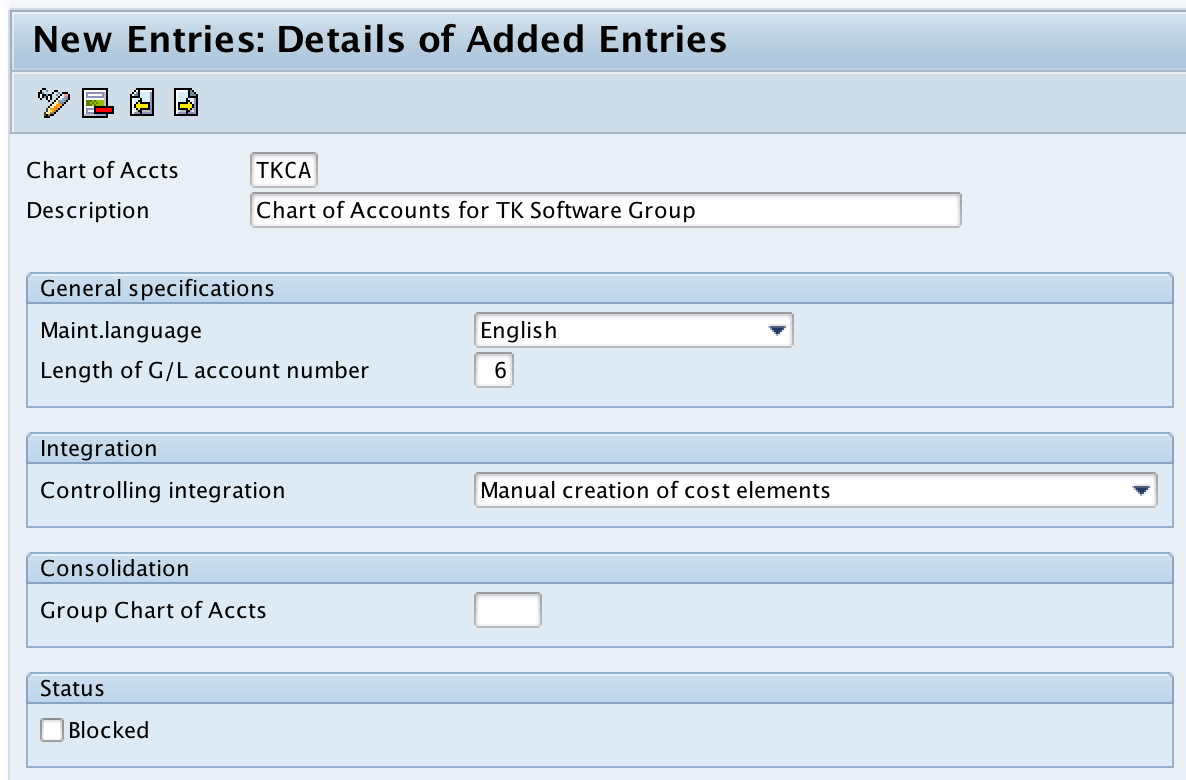
Step 4) Now click on save button and press enter to save in your customizing request number.

Successfully we have created chart of accounts in SAP.
Important Fields in SAP Chart of Accounts OB13
The OB13 screen contains only the chart of accounts level definition. It does not create the individual G/L accounts. The following field meanings are useful while reviewing the COA configuration.
| Field in OB13 | Purpose in chart of accounts setup |
|---|---|
| Chart of Accts | Four-character key that uniquely identifies the chart of accounts. |
| Description | Text description that helps users identify the business purpose of the COA. |
| Maint.Language | Language used for maintaining account names and descriptions. |
| Length of G/L account number | Maximum account number length allowed for G/L accounts in the chart of accounts. |
| Group chart of accounts | Optional group COA used when operating accounts must be mapped to group reporting accounts. |
What to Do After Creating Chart of Accounts in SAP
Creating the chart of accounts in OB13 is only the first part of the FI setup. After the COA is created, it must be assigned and used in related configuration before postings can be made correctly.
- Assign chart of accounts to company code: A company code must be linked to an operative COA before G/L accounts can be used for postings in that company code.
- Define account groups: Account groups control number ranges and field selection for G/L account master records.
- Create G/L account master records: Individual accounts are created under the chart of accounts and extended to the required company codes.
- Maintain field status and control settings: Posting behavior depends on account settings such as field status group, reconciliation account indicator, tax category, and open item management where applicable.
- Test postings in a non-production client: Test sample postings and financial reports before transporting the configuration to production.
Chart of Accounts Design Example in SAP FI
Assume an organization wants to use a six-digit account number structure. A simple numbering approach can be designed as follows.
| Account range | Account category | Example G/L account |
|---|---|---|
| 100000 – 199999 | Assets | Bank account, cash account, receivables |
| 200000 – 299999 | Liabilities | Payables, tax payable, loans |
| 300000 – 399999 | Equity | Share capital, reserves, retained earnings |
| 400000 – 499999 | Revenue | Domestic sales, export sales, service income |
| 500000 – 999999 | Expenses | Salary expense, rent, depreciation, utilities |
This is only an example. The actual account ranges should be designed based on reporting requirements, statutory requirements, controlling integration, and group reporting needs.
Common Mistakes While Creating COA in SAP
- Choosing account number length without planning: The length should support current and future account numbering needs.
- Creating too many charts of accounts: Too many COA structures can make reporting and consolidation more difficult.
- Not planning group account mapping: If group reporting is required, group chart of accounts mapping should be considered early.
- Confusing COA with G/L account creation: OB13 creates the chart of accounts list; individual G/L accounts are created separately.
- Ignoring local reporting requirements: Country specific chart of accounts may be needed where legal reporting requires local account numbers.
QA Checklist for SAP Chart of Accounts Tutorial Review
- Confirm that the tutorial clearly explains chart of accounts, G/L account, operative COA, group COA, and country specific COA.
- Verify that OB13 is presented only for maintaining the chart of accounts list, not for creating every G/L account.
- Check that existing company code and SPRO links remain unchanged.
- Confirm that the screenshot order still matches the OB13 configuration steps.
- Review whether the article explains the next configuration steps after COA creation, especially company code assignment and G/L account creation.
FAQs on Chart of Accounts in SAP
Is COA the same as chart of accounts in SAP?
Yes. COA is the short form of chart of accounts. In SAP FI, it refers to the complete list or framework of G/L accounts used for financial accounting postings and reporting.
What is the transaction code to create chart of accounts in SAP?
The transaction code to create or maintain the chart of accounts list in SAP is OB13. You can also reach the same configuration through SPRO under General Ledger Accounting master data preparations.
What are the three types of chart of accounts in SAP?
The three commonly used types are operative chart of accounts, country specific chart of accounts, and group chart of accounts. The operative COA is used for daily postings, the country COA supports local statutory reporting, and the group COA supports group reporting and consolidation.
What are the five main account types in a chart of accounts?
The five main account types are assets, liabilities, equity, revenue, and expenses. SAP account numbering can be designed to group accounts under these reporting categories.
Can multiple company codes use the same chart of accounts in SAP?
Yes. Multiple company codes can use the same operative chart of accounts. This is common when an organization wants consistent account numbers and easier comparison across company codes.