 TutorialKart.com
What is account group in SAP FI?
An account group in SAP is a configuration object used to classify similar G/L accounts under one group. Each G/L account group is assigned to a chart of accounts, so the account group can be used only for G/L accounts that belong to that chart of accounts.
In SAP FI, account groups help finance teams organize the general ledger into meaningful ranges such as liabilities, assets, income, and expenses. The account group also controls how G/L account master records are created and which account numbers are allowed for a particular type of account.
The account groups in SAP specify:
- The account number range interval from which the account number is selected when you create a general ledger master record.
- The screen layout or field status for G/L account master data fields during account creation and maintenance.
- The logical grouping of accounts within a chart of accounts, such as fixed assets, current assets, sales, personnel cost, or depreciation.
Why G/L account groups are used in SAP chart of accounts
If you want to check current asset balances or prepare P&L accounts and balance sheets, you should not have to review every G/L account manually and decide its reporting category each time. To reduce this effort, SAP provides account groups for structured account classification.
Within an account group, you can maintain accounts inside a defined number range. For example, cash accounts can be created within the current assets range 200000 to 200099. This makes account search, posting, reporting, and maintenance easier for end users and FI consultants.
In real-time business scenarios, many companies design the G/L account number series in a structured way:
- All liability accounts start with the 1 series.
- All asset accounts start with the 2 series.
- All income accounts start with the 3 series.
- All expenditure accounts start with the 4 series.
This series-based design helps users while posting transactions. For example, when a user posts to a salaries account, which is an expenditure account, entering *4 in the account search can display expenditure accounts from the 4 series, depending on the search help and system setup.
What SAP account group controls in G/L master data
A G/L account group is not only a name for grouping accounts. It has a direct impact on the way master data is created in SAP FI. The two most important controls are account number range and field status.
| Control area | Meaning in SAP FI | Example |
|---|---|---|
| Number range | Defines the from-account and to-account interval allowed for the G/L account group | Fixed assets from 200000 to 200099 |
| Field status | Controls which G/L master fields are required, optional, hidden, or displayed during maintenance | Tax category, account currency, reconciliation account fields |
| Account classification | Groups similar G/L accounts for easier maintenance and reporting design | Sales, other income, personnel cost, depreciation |
| Chart of accounts dependency | Account groups are maintained for a specific chart of accounts | Account group FAST under chart of accounts TKCA |
This is why account group design should be completed carefully before creating large numbers of G/L accounts. A poor number range design can make future account maintenance and reporting harder.
G/L account group example for liabilities, assets, income, and expenses
In this configuration example, we are going to define the following account groups for chart of accounts TKCA.
| Chrt/Accts | Acct Group | Name | From Acct | To account |
| TKCA | SCPL | Share Capital | 100000 | 100099 |
| TKCA | RSPL | Reserves & Surplus | 100100 | 100199 |
| TKCA | ACBL | Accumulated Depreciation | 100200 | 100299 |
| TKCA | SCLN | Secured Loans | 100300 | 100399 |
| TKCA | UNSL | Unsecured Loans | 100400 | 100499 |
| TKCA | CLPR | Current Liabilities & Prov | 100500 | 100599 |
| TKCA | FAST | Fixed Assets | 200000 | 200099 |
| TKCA | CAST | Current Assets, Loans & Adv | 200100 | 200199 |
| TKCA | SALE | Sales | 300000 | 300099 |
| TKCA | OTHR | Other Income | 300100 | 300199 |
| TKCA | INCR | Increase / Decrease in Stock | 300200 | 300299 |
| TKCA | RMCN | Raw Material Consumption | 400000 | 400099 |
| TKCA | PRSN | Personnel Cost | 400100 | 400199 |
| TKCA | MFRG | Manufacturing cost | 400200 | 400299 |
| TKCA | ADMN | Administration cost | 400300 | 400399 |
| TKCA | INTR | Interest | 400400 | 400499 |
| TKCA | DEPR | Depreciation | 400500 | 400599 |
The above table is an example for learning and practice. In a live SAP project, the account group keys, names, and number ranges should be finalized after reviewing the legal chart of accounts, group reporting requirements, local reporting needs, and future account expansion.
Difference between G/L account group, customer account group, and vendor account group in SAP
The term account group is used in more than one SAP area. This tutorial explains G/L account groups, which are maintained for general ledger accounts. Customer and vendor account groups are different configuration objects and are used for business partner, customer, or supplier master data depending on the SAP release.
| Account group type | Used for | Common transaction in classic configuration |
|---|---|---|
| G/L account group | General ledger account master records | OBD4 |
| Customer account group | Customer master or customer role in business partner master data | OBD2 in classic customer configuration |
| Vendor account group | Vendor master or supplier role in business partner master data | OMSG in classic vendor configuration |
If your requirement is to create a G/L account group for chart of accounts, use the G/L account group configuration explained below. If your requirement is customer or vendor account grouping, use the relevant AR, AP, or Business Partner configuration path for your SAP release.
How to create G/L account group in SAP using OBD4
You can define account groups in SAP by using one of the following navigation methods.
- Transaction code: – OBD4
- Menu Path: – SPRO – Financial Accounting – General Ledger Accounting — G/L Accounts — Master Data — Preparations — Define Account Group.
In SAP S/4HANA systems, the exact menu text can vary based on release, business role, and whether the configuration is performed through classic IMG, SAP GUI, or configuration apps. For official product behavior, refer to SAP Help for G/L account master data in SAP S/4HANA and SAP S/4HANA Cloud finance configuration guidance.
Step 1: Enter SAP transaction code OBD4
Step 1) Enter T Code “OBD4” in the SAP command field and enter.

Step 2: Choose new entries for SAP G/L account groups
Step 2) On change view “G/L Account Groups” overview screen, click on new entries to maintain the accounts.

Step 3: Enter chart of accounts, account group key, and number range
Step 3) On new entries account group screen, update the following details.
- Chrt/Accts: – Give the chart of accounts key for which you are creating account group in SAP.
- Acct Group: – Enter the account group key, you are allowed up to 4 digits.
- Name: – Update the name of the account group.
- From Account: – Update starting number of account group.
- To Account: – Update the last number of account group.
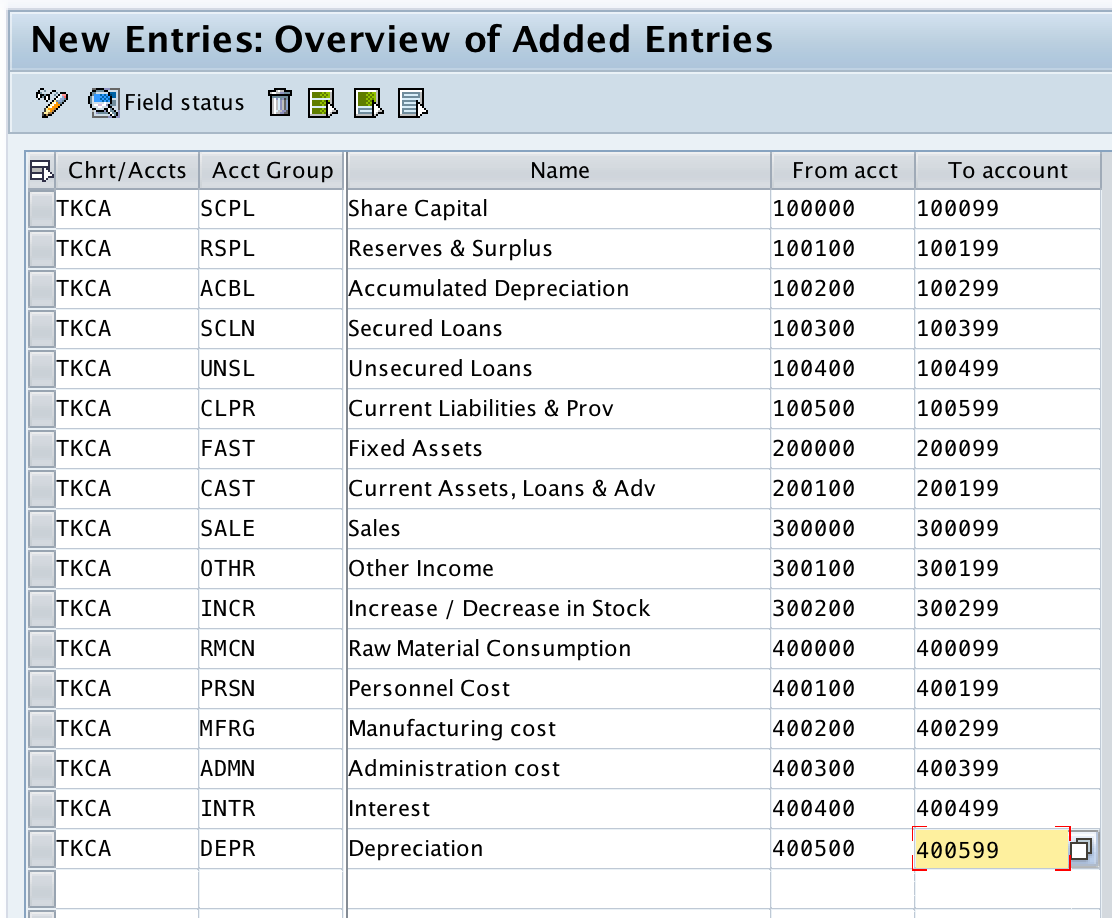
After entering the account group details, review the number ranges carefully. Do not create overlapping ranges unless the design is intentional and approved by the finance configuration team.
Step 4: Save the SAP account group configuration
Step 4) After updating the details, click on save button.

Now select your customizing request number and press enter to save the configured details in your request.
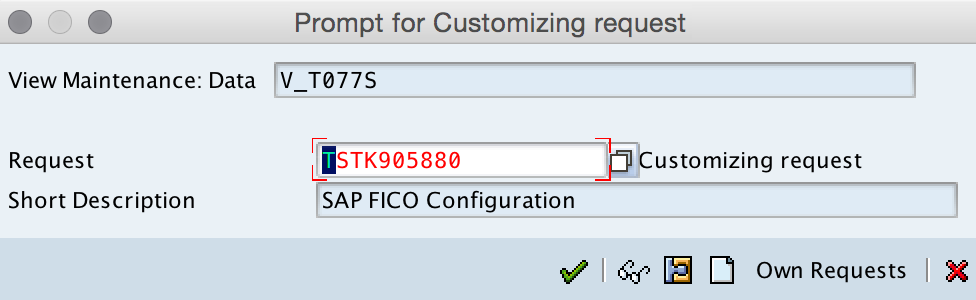
Successfully we have defined account group in SAP.
SAP G/L account group field status and screen layout
After defining the basic account group and number range, you can maintain the field status for the G/L account group. Field status controls how fields behave when a G/L account master record is created or changed.
- Required entry: The user must enter a value before saving the G/L account master.
- Optional entry: The user may enter a value, but it is not mandatory.
- Display: The field is visible but cannot be changed in that screen context.
- Suppress: The field is hidden from the screen layout.
Field status should match the nature of the account group. For example, reconciliation account settings are relevant for some balance sheet account designs, while tax or cost element settings may be relevant for other types of accounts depending on the system and business process.
Account group design checklist for SAP FI configuration
- Confirm the chart of accounts before creating the G/L account group.
- Reserve enough account numbers for future expansion within each account group.
- Keep liability, asset, income, and expense accounts in clearly separated number ranges.
- Check that account group ranges do not conflict with existing G/L accounts.
- Maintain field status according to the account type and business process.
- Confirm whether the same chart of accounts is used across controlling areas or company codes that need common reporting.
- Transport the configuration through the correct SAP landscape path after testing.
Common mistakes while defining account group in SAP
- Mixing up G/L, customer, and vendor account groups: OBD4 is for G/L account groups, while customer and vendor account groups are configured separately.
- Creating too small a number range: If the range is too narrow, the business may run out of available G/L account numbers later.
- Using unclear account group names: Names such as Miscellaneous or General should be avoided unless the purpose is clearly documented.
- Ignoring field status: Number ranges alone are not enough; field status determines how G/L master data is maintained.
- Changing account group design after go-live without review: Changes can affect master data governance, reporting consistency, and user posting behavior.
Account group in SAP FAQs
How to define account group in SAP?
You can define a G/L account group in SAP using transaction code OBD4. Enter the chart of accounts, account group key, account group name, from-account number, and to-account number, then save the configuration in a customizing request.
What does account group control in SAP FI?
In SAP FI, a G/L account group controls the allowed account number range and the field status or screen layout for G/L account master data. It also helps classify similar accounts under the same chart of accounts.
Is SAP account group assigned to chart of accounts?
Yes. A G/L account group is maintained for a specific chart of accounts. The same account group key can have meaning only in relation to the chart of accounts where it is configured.
What is the difference between account group and chart of accounts in SAP?
A chart of accounts is the complete list or structure of G/L accounts used by one or more company codes. An account group is a subdivision inside that chart of accounts, used to group similar G/L accounts and control number ranges and field layout.
Which transaction code is used for G/L account group in SAP?
The classic SAP transaction code for defining G/L account groups is OBD4. Menu paths and configuration apps may vary in SAP S/4HANA depending on the system release and implementation model.