 TutorialKart.com
How to Assign Field Status Variant to Company Code in SAP
In this SAP tutorials, you will learn how to assign field status variant to company Code in SAP FICO. In our previous training we have learned how to define field status variants and field status groups in SAP. The link between company code and field status variant is established through this assignment.
A field status variant controls which fields are suppressed, optional, required, or displayed during accounting document entry. After field status groups are created under a field status variant, the variant must be assigned to the company code. Without this assignment, the company code cannot consistently apply the field status rules maintained for G/L account posting screens.
Also Read:
- How to define chart of accounts in SAP
- What is fiscal year
- Define retained earnings account in SAP
- Define posting period variant
- Open and close posting periods variant
Purpose of assigning a field status variant to a company code in SAP FICO
The field status variant is created at configuration level and contains one or more field status groups. These field status groups are later entered in G/L account master records. When users post documents, SAP checks the company code, the G/L account, the field status group, and the posting key field status to determine the final screen field behavior.
- Field status variant is a collection of field status groups.
- Field status group defines whether fields such as cost center, profit center, business area, text, assignment, and reference are required, optional, displayed, or suppressed.
- Company code assignment tells SAP which field status variant should be used for postings in that company code.
- G/L account master data uses the field status group from the assigned field status variant.
Prerequisites before using transaction code OBC5
Before you assign field status variant to company code in SAP, check the following configuration items. This avoids common errors during document entry and G/L master maintenance.
| Configuration item | Where it is maintained | Why it is needed |
|---|---|---|
| Company code | Enterprise Structure configuration | The field status variant is assigned to a valid company code. |
| Field status variant | Define field status variants, commonly accessed through OBC4 | The variant must exist before it can be assigned. |
| Field status groups | Inside the field status variant | These groups control field behavior during postings. |
| G/L account master data | G/L account company code segment | The correct field status group must be entered in the relevant G/L accounts. |
| Transport request | SAP customizing system | The assignment is a configuration change and normally needs to be transported to quality and production systems. |
SAP menu path and transaction code for company code field status variant assignment
You can assign field status variants to company code by using the following methods.
- Transaction code: – OBC5
- Menu Path: – SPRO –> IMG –> Financial Accounting (New) –> Financial Accounting Global Settings (New) –> Ledgers –> Fields –> Assign company code to field status variants.
Step 1: Open OBC5 for assigning field status variant to company code
Step 1) Enter SAP T code “OBC5” in the SAP command field and press enter to continue.

You can also reach the same screen from the SAP Implementation Guide. Using the transaction code is faster during practice, while the IMG path is useful when documenting configuration steps for a project.
Step 2: Find the company code in the field status variant assignment screen
Step 2) On change view “Assign company codes –> Field status variant” overview screen, click on position button and enter your company code in the given field. So your company code display on top of the screen and it will be easy to assign your company code.
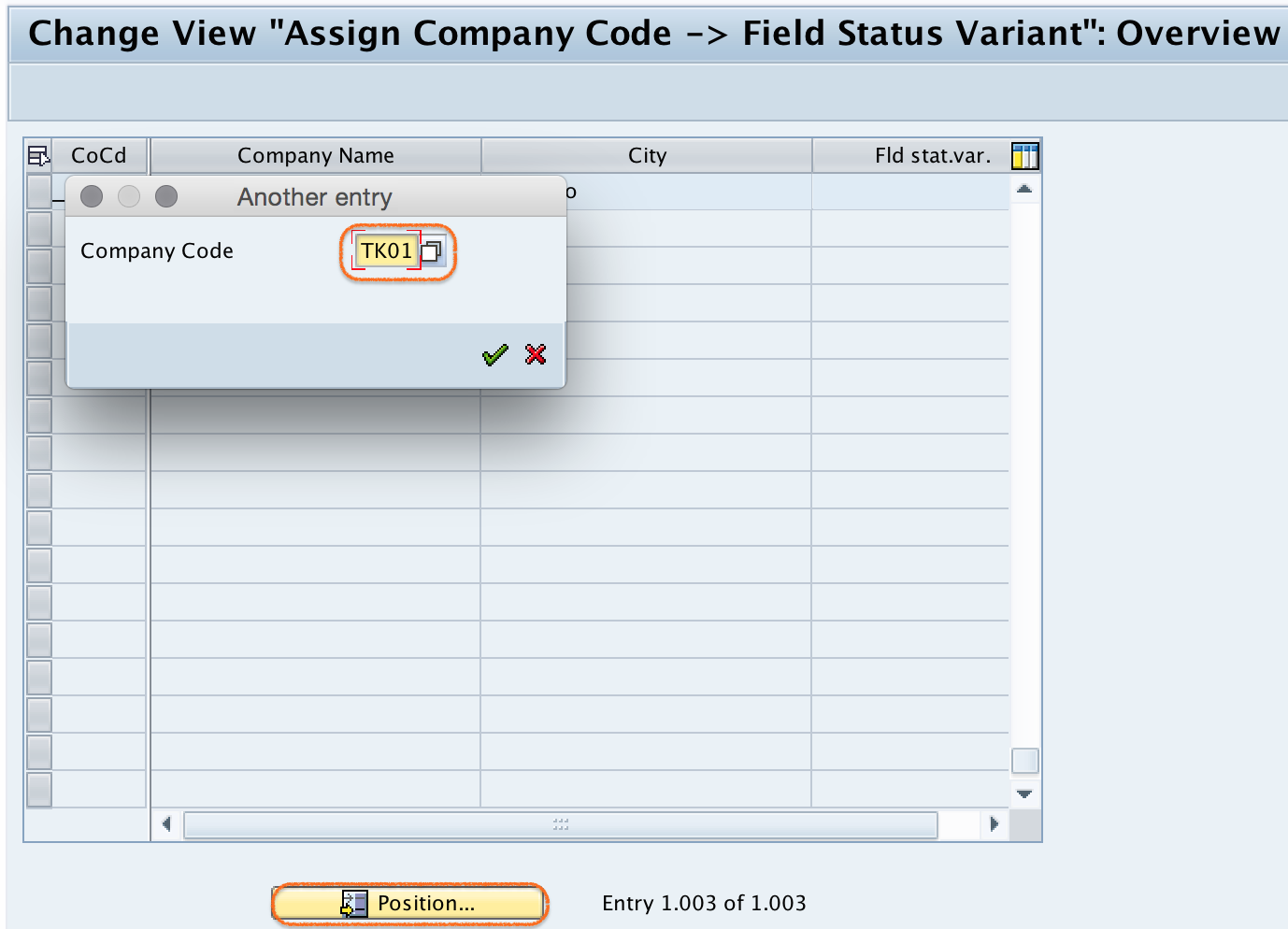
If your company code is not displayed, confirm that the company code has already been defined. The assignment screen lists company codes that are available for configuration in the client.
Step 3: Enter the field status variant for the selected company code
Step 3) For company code “TK01” assign field status variant “TKFV”.

In this example, TK01 is the company code and TKFV is the field status variant. In a real project, use the field status variant approved for that company code. Many company codes can use the same field status variant if their posting field requirements are the same.
Step 4: Save the SAP field status variant assignment
Step 4) Click on save button and save the configured assignment details.
SAP may ask for a customizing request depending on the system settings. Select the correct transport request or create a new one as per your project process.
Successfully we have assigned company code to field status variant in SAP.
How field status variant assignment affects SAP posting screens
After the field status variant is assigned to the company code, the field status group maintained in a G/L account becomes meaningful for postings in that company code. For example, if a particular expense account uses a field status group where cost center is required, users must enter a cost center while posting to that account, provided the posting key field status does not conflict.
| Field status option | Meaning during document entry | Example use |
|---|---|---|
| Suppress | The field is hidden and cannot be entered. | Hide a field that is not relevant for the account. |
| Required entry | The user must enter a value before posting. | Require cost center for expense accounts. |
| Optional entry | The user may enter a value, but it is not mandatory. | Allow assignment text or reference details when needed. |
| Display | The field is visible but not editable. | Show values that should not be changed during entry. |
When field status settings conflict, SAP applies its field status logic between the posting key and the G/L account field status group. Required and suppressed fields should be reviewed carefully because conflicting configuration can stop users from posting accounting documents.
OBC4 and OBC5 difference in SAP field status configuration
Two transaction codes are often used together in this configuration area. OBC4 is used to define field status variants and field status groups. OBC5 is used to assign the field status variant to a company code. First define the variant and field status groups, then assign the variant to the company code.
| SAP transaction | Purpose | When to use it |
|---|---|---|
| OBC4 | Define field status variants and field status groups | Use before assignment, when creating or changing field control rules. |
| OBC5 | Assign company code to field status variant | Use after the field status variant is ready. |
| Company code global settings | Maintain company code-level finance settings | Use for related company code settings, but not as a replacement for OBC5 assignment. |
Field status variant assignment compared with fiscal year variant assignment
Field status variant and fiscal year variant are different company code assignments in SAP FICO. A field status variant controls screen fields during postings. A fiscal year variant defines the financial year structure, periods, and special periods used by the company code. Both are assigned to company code, but they control different parts of Financial Accounting configuration.
| Variant type | Controls | Typical question it answers |
|---|---|---|
| Field status variant | Posting screen field behavior | Should cost center, text, assignment, or business area be required, optional, hidden, or displayed? |
| Fiscal year variant | Fiscal periods and special periods | Which accounting periods belong to the company code’s fiscal year? |
| Posting period variant | Open and closed posting periods | Which periods are currently open for posting? |
Common errors while assigning field status variant to company code
- Field status variant not created: Create or copy the required field status variant before assigning it in OBC5.
- Wrong company code selected: Use the Position button to locate the correct company code before entering the variant.
- Field status group missing in G/L account: After assignment, confirm that relevant G/L accounts have the correct field status group in the company code segment.
- Required field not available during posting: Review posting key field status and G/L field status group together to identify conflicts.
- Transport not captured: Save the assignment in the correct customizing request so that it can be moved to the next system.
- Changing production configuration without testing: Test the impact in a quality system before changing field status behavior for live postings.
Assign Field Status Variant to Company Code in SAP FAQ
What is the TCode for assigning field status variant to company code in SAP?
The transaction code is OBC5. You can also use the IMG menu path under Financial Accounting Global Settings to assign company code to field status variants.
What is the TCode for defining field status variant in SAP FICO?
The commonly used transaction code for defining field status variants and field status groups is OBC4. After defining the variant in OBC4, assign it to the company code in OBC5.
Can one field status variant be assigned to multiple company codes?
Yes. The same field status variant can be assigned to multiple company codes when the same posting field control is required across those company codes.
How do I change a field status variant assigned to a company code?
Open OBC5, locate the company code, replace the existing field status variant with the required variant, and save the change in a customizing request. Test the effect before moving the change to production.
Is field status variant the same as fiscal year variant?
No. A field status variant controls fields during accounting document entry. A fiscal year variant controls fiscal periods and the structure of the financial year for the company code.
QA checklist for SAP field status variant assignment tutorial
- Confirm that the tutorial clearly states OBC5 as the transaction for assigning field status variant to company code.
- Confirm that OBC4 is explained separately as the transaction for defining field status variants and field status groups.
- Check that the example company code TK01 and field status variant TKFV match the screenshots.
- Verify that the menu path and transaction-code method both point to the same configuration activity.
- Confirm that the article explains why G/L account field status groups are still required after company code assignment.
- Check that the FAQ answers distinguish field status variant, fiscal year variant, and posting period variant correctly.
Conclusion: Company code to field status variant assignment in SAP
Assigning a field status variant to a company code in SAP connects company code postings with the field status groups created in configuration. Use OBC5 to maintain the assignment, save the change in the correct customizing request, and test postings with relevant G/L accounts. Once this setup is complete, SAP can apply the intended field status rules during Financial Accounting document entry.