 TutorialKart.com
What is Accounts Payable (AP) in SAP FICO?
Accounts Payable (AP) in SAP FICO is the vendor subledger used to record, manage, and clear amounts that a company owes to its suppliers. In SAP, sundry creditors are handled through accounts payable, while sundry debtors are handled through accounts receivable.
Accounts payable stores vendor-wise accounting data such as vendor invoices, credit memos, down payments, outgoing payments, payment terms, withholding tax details, and open items. Each vendor transaction is posted to a vendor account and is also reflected in the general ledger through a reconciliation account.
In practical SAP FI work, AP answers three basic questions: which vendor is owed money, why the amount is owed, and whether the open item has been paid or cleared. This makes SAP Accounts Payable important for invoice processing, payment runs, vendor balance reporting, and period-end financial closing.
How SAP Accounts Payable connects vendor accounts with the general ledger
SAP Accounts payable accounting is also called subledger accounting because business transactions are carried out individually in vendor accounts. The vendor account is not normally a general ledger account by itself. Instead, the vendor master is assigned to a reconciliation account, and SAP updates that reconciliation account automatically whenever a vendor posting is made.
This automatic update keeps the vendor subledger and general ledger in balance. For example, when a vendor invoice is posted, the vendor open item is created in AP and the payable liability is updated in the reconciliation account. When the payment is posted, the vendor open item is cleared and the bank or payment clearing account is updated.
| SAP AP event | Typical accounting effect | What happens in Accounts Payable |
|---|---|---|
| Vendor invoice | Expense, asset, or GR/IR is debited; vendor payable is credited | An open item is created for the vendor |
| Vendor credit memo | Vendor payable is reduced | A credit item is created or matched against an existing item |
| Outgoing payment | Vendor payable is debited; bank or clearing account is credited | The vendor invoice is cleared fully or partially |
| Payment difference | Difference is posted according to tolerance and configuration | The remaining amount may be cleared or left open |
Is Accounts Payable a debit or credit account in SAP?
Accounts payable is a liability, so the payable balance normally carries a credit balance. A vendor invoice increases the payable liability and is posted as a credit to the vendor/reconciliation account. A vendor payment reduces the payable liability and is posted as a debit to the vendor/reconciliation account.
The individual posting depends on the document type, account determination, tax settings, and whether the transaction is an invoice, credit memo, down payment, or payment. However, the basic rule remains: AP increases with credits and decreases with debits.
Where SAP FI Accounts Payable fits with MM, GL, and Asset Accounting
SAP FI accounts payable can be integrated with SAP FI – GL (General Ledger), FI-AA (Asset Accounting), SAP MM (Material Management), and payment processing. The deliveries and invoices are managed according to the vendors.
In a procurement process, SAP MM may create the purchase order and goods receipt, while the vendor invoice is entered through invoice verification. The accounting document then updates SAP FI, including the vendor account and the relevant GL accounts. If the invoice relates to a fixed asset, Asset Accounting can also be updated based on the asset account assignment.
- FI-GL integration: Vendor postings update reconciliation accounts and financial statements.
- MM integration: Purchase orders, goods receipts, and invoice verification support the procure-to-pay process.
- FI-AA integration: Vendor invoices for fixed assets can update asset values when the asset is assigned correctly.
- Bank accounting integration: Outgoing payments update bank, clearing, and payment-related accounts.
SAP Accounts Payable document flow for invoice posting and payment clearing
A typical SAP AP process starts when a supplier invoice is received and ends when the vendor open item is cleared. The exact process differs by company, but the accounting flow usually follows these steps.
- Create or extend the vendor master: Maintain vendor details, company code data, payment terms, reconciliation account, and payment method data.
- Post the vendor invoice: Enter the invoice manually in FI or through MM invoice verification, depending on whether a purchase order is involved.
- Review the vendor open item: Check due date, payment block, tax, payment method, and amount.
- Run or post payment: Use manual outgoing payment or Automatic Payment Program based on the business process.
- Clear the vendor item: Match the payment against the invoice so that the open liability is removed from the vendor account.
- Review vendor balance and aging: Use vendor line item and balance reports for reconciliation and period-end review.
Common SAP Accounts Payable transaction codes for AP users
The transaction codes available in a system depend on SAP release, authorization, and whether the company uses SAP ECC or SAP S/4HANA. In SAP S/4HANA, vendor master maintenance is commonly handled through Business Partner functionality, while many FI posting and reporting transactions are still familiar to AP users.
| Transaction code | Common AP use | Notes for SAP FICO users |
|---|---|---|
| BP | Create or maintain business partner/vendor data | Common in SAP S/4HANA for vendor master maintenance |
| FK01 / FK02 / FK03 | Create, change, or display vendor master | Common in SAP ECC environments |
| FB60 | Post vendor invoice in FI | Used when invoice posting is handled directly in Financial Accounting |
| MIRO | Enter invoice through Logistics Invoice Verification | Used for purchase-order-based vendor invoices |
| F-53 | Post manual outgoing payment | Used when paying and clearing a vendor manually |
| F110 | Automatic Payment Program | Used for proposal, payment run, and payment media process |
| F-44 | Clear vendor open items | Used when matching vendor debits and credits |
| FBL1N | Display vendor line items | Used to review open, cleared, and parked/vendor items depending on layout |
Important SAP Accounts Payable configuration steps
The main configuration work in SAP Accounts Payable is to control vendor master data, number assignment, field status, payment behavior, tolerances, and account determination. These settings allow vendor invoices and payments to post consistently across company codes.
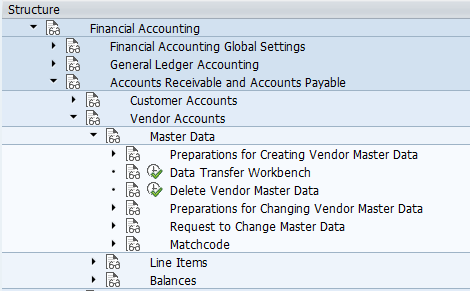
| S.no | SAP Accounts Payable Configuration steps |
| 1 | Define vendor account groups in SAP |
| 2 | Create number ranges for vendor accounts |
| 3 | Assign number ranges to vendor accounts |
| 4 | Maintain terms of payment for vendors |
| 5 | Define accounts for exchange rate difference |
| 6 | Define field groups for vendor master records |
| 7 | Define accounts for bank charges |
| 8 | Define payment block reasons |
| 9 | Define tolerance for vendors in SAP |
| 10 | Define accounts for payment differences |
| 11 | Set up all company codes for payment transactions |
| 12 | Set up payment methods per country for payment transactions |
| 13 | Define void reason codes |
| 14 | Define reconciliation accounts for vendors |
| 15 | Define interest calculation types |
| 16 | Define time dependent terms |
| 17 | Automatic Payment Program (APP) |
SAP Accounts Payable setup checks before posting vendor invoices
Before testing vendor invoice posting, check the core AP settings in a controlled test company code. This avoids common posting errors such as missing reconciliation account, incorrect payment method, blocked payment proposal, or unassigned number range.
- Vendor account group check: Confirm that the account group controls the correct number range and field status for the vendor type.
- Reconciliation account check: Confirm that the vendor master points to the correct sundry creditor or trade payable GL account.
- Payment terms check: Confirm baseline date, due date calculation, cash discount, and installment settings where applicable.
- Tolerance check: Confirm that small payment differences are handled according to company policy.
- Payment method check: Confirm that country-level and company-code-level payment method settings are complete.
- Open item clearing check: Post a test invoice, post a payment, and verify that the vendor line item moves from open to cleared status.
SAP AP account, vendor account, and reconciliation account differences
An AP account in SAP is often discussed in three related ways. The vendor account stores supplier-specific open items. The reconciliation account is the general ledger account that collects the accounting value of vendor postings. The AP process is the end-to-end work of recording vendor invoices, managing due items, making payments, and clearing liabilities.
Users should not post directly to the vendor reconciliation account for normal AP invoices. Vendor postings should be made to the vendor account so that the vendor subledger, open item reports, payment program, and GL balances stay aligned.
Official SAP references for Accounts Payable operations
For product-specific behavior, configuration menu paths, and SAP S/4HANA process details, refer to the relevant SAP documentation for your system release. Useful starting points include SAP Help for Accounts Payable and SAP Learning material on managing accounts payable operations.
SAP Accounts Payable FAQ
What is AP account in SAP?
An AP account in SAP usually refers to a vendor-related payable account. Vendor line items are stored in the vendor subledger, while the assigned reconciliation account updates the general ledger liability balance automatically.
What does AP stand for in SAP?
AP stands for Accounts Payable. In SAP FICO, it is the area that manages vendor invoices, vendor credit memos, outgoing payments, open items, and vendor balance reporting.
Is Accounts Payable a debit or credit in SAP?
Accounts Payable is a liability and normally has a credit balance. Vendor invoices increase AP with a credit posting, while payments reduce AP with a debit posting to the vendor or reconciliation account.
What is the difference between SAP AP and SAP AR?
SAP AP manages money owed to vendors. SAP AR manages money owed by customers. AP is linked to vendor accounts and payable liabilities, while AR is linked to customer accounts and receivable assets.
Does SAP Accounts Payable require SAP MM?
No. SAP FI can post vendor invoices directly in Accounts Payable. SAP MM is required when the invoice is part of a purchase-order-based procurement process, such as goods receipt and invoice verification.
Continue to read free SAP tutorial that guides you how to configure SAP R/3 system step by step with real time scenarios.