 TutorialKart.com
Terms of payment / Payment terms are used in SAP to define the conditions between a business partner and an organization for settling invoices. Payment terms determine the invoice due date from the baseline date and can also define cash discount percentages for early payment.
In accounts payable and accounts receivable, payment terms are copied into vendor master data, customer master data, purchase documents, sales documents, and accounting documents depending on the process. During invoice posting, SAP uses the payment term, baseline date, and discount days to calculate when the invoice is due and whether a discount can be taken.
Navigation
You can maintain payment terms in SAP by using transaction code OBB8 or IMG menu path.
| SAP R/3 Role Menu | Maintain Payment Terms in SAP |
| Transaction Code | OBB8 |
| IMG Menu Path | SPRO >IMG (Implementation Guide for R/3 Customizing) > Financial Accounting (New) > Accounts Receivable & Accounts Payable > Business Transactions > Master Data > Maintain Terms of Payment |
How to Maintain Terms of Payment in SAP Using OBB8
In this SAP FICO tutorial, you will learn how to maintain payment terms in SAP step by step using transaction code OBB8. The example creates a payment term with two cash discount levels and a final net due date.
Configuration Values
| Payment Term | Description |
| TP06 |
|
Payment Terms Fields Used in OBB8 Configuration
Before creating the payment term, it is useful to understand what the main OBB8 fields control. These settings decide how SAP calculates due dates and cash discount dates when invoices are posted.
| OBB8 field | Purpose in payment terms |
|---|---|
| Payt Terms | Four-character payment term key that identifies the terms of payment, such as TP06. |
| Sales Text | Description shown to users and, in some processes, copied to business documents. |
| Account Type | Controls whether the payment term is valid for customer accounts, vendor accounts, or both. |
| Default for baseline date | Determines the default date used for due date calculation, such as posting date, document date, entry date, or no default. |
| Cash discount percentage and days | Defines discount rates and the number of days within which the discount is valid. |
| Net payment terms | Defines the final due date when no cash discount is taken. |
Step 1: Open SAP Transaction Code OBB8 for Payment Terms
Step 1 : – Enter transaction code “OBB8” in the SAP command field and press Enter.
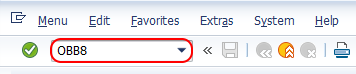
OBB8 opens the configuration activity for maintaining terms of payment. If your system requires customizing transports, the saved entry may be captured in a transport request.
Step 2: Create New Entries for SAP Payment Terms
Step 2 : – On change view “terms of payment” overview screen, click on new entries button to create new payment terms in SAP as per organizational requirements.

You can also use an existing payment term as a reference if a similar payment term already exists. For a new payment term, choose a key that follows the naming convention used in your SAP system.
Step 3: Enter Payment Term Key, Baseline Date and Discount Details
Step 3 : – On new entries payment terms screen, update the following details.
- Payt Terms : – Update the four digits key that identifies as terms of payment in SAP – TP06
- Sales Text : – Update the description name of payment terms as 10%-10days, 5%-25 days, 45 days due net.
- Account Type : – Choose the account type that the payment term is applicable for. If this payment term if for vendor accounts choose vendor option or for customer accounts choose customer option. Choose both account type to use this payment terms for both customer and vendor accounts.
- Default for baseline data : – Choose the baseline date based on the requirements and the possible entries are No default, posting date, document date and entry date.
- Payment Terms : – Update the details of percentage, No.of days.
- Explanation : – After you update the payment terms, the system automatically generates details information terms of payment.
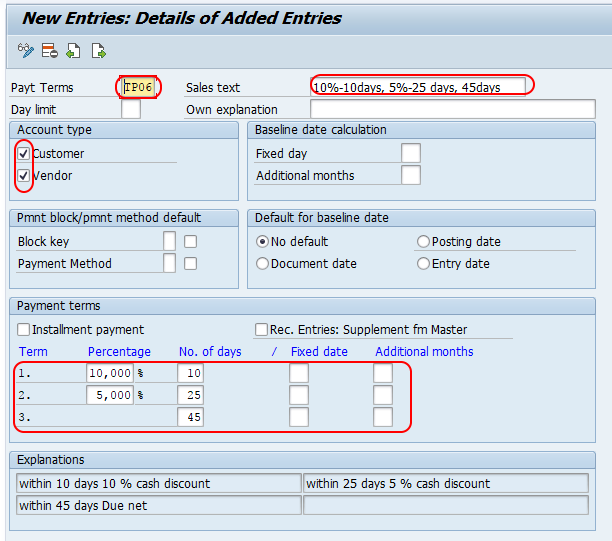
For the payment term TP06, the logic is: give 10% discount if payment is made within 10 days, give 5% discount if payment is made within 25 days, and make the full invoice amount due within 45 days if no discount condition is met.
After maintaining all the required details, click on save button and save the configured terms of payment details in SAP.
How SAP Calculates Due Date from Payment Terms
SAP calculates the payment due date from the baseline date and the number of days entered in the payment term. The baseline date can be taken from the document date, posting date, entry date, or entered manually depending on the OBB8 setting and the document process.
For example, if the baseline date is 01 June and the payment term is 10 days discount, 25 days discount, and 45 days net, the calculation can be understood as follows.
| Payment condition | Calculation from baseline date | Result for baseline date 01 June |
|---|---|---|
| 10% cash discount | Within 10 days | Valid up to 11 June, depending on system date calculation rules. |
| 5% cash discount | Within 25 days | Valid up to 26 June, depending on system date calculation rules. |
| Net due date | Within 45 days | Due up to 16 July, depending on system date calculation rules. |
The exact displayed dates can vary based on calendar settings, baseline date rules, and the way the document is entered. In FI documents, users can usually review the baseline date, cash discount date, and net due date in the payment tab or line item details.
Where SAP Payment Terms Are Used in FI, Vendor and Customer Processes
Payment terms maintained in OBB8 are not used only in one screen. They can be assigned in master data and copied into transactions where payment due dates are needed.
| Area | How payment terms are used |
|---|---|
| Vendor master | Default payment terms can be maintained for vendor invoices and purchase-related processes. |
| Customer master | Default payment terms can be maintained for customer invoices and sales-related processes. |
| Vendor invoice posting | Transactions such as vendor invoice posting use the payment term to determine payable due dates. |
| Customer invoice posting | Transactions such as customer invoice posting use the payment term to determine receivable due dates. |
| Automatic payment program | Open items become eligible for payment based on due dates, cash discount settings, and payment run parameters. |
If a payment term is entered in master data, it is usually proposed during document entry. Users may be able to change it in the document if configuration and authorization allow it.
Important SAP Tables and Tcodes Related to Payment Terms
When checking payment term configuration or troubleshooting due date issues, the following technical references are commonly useful.
| SAP object | Meaning |
|---|---|
OBB8 | Transaction code used to maintain terms of payment. |
T052 | SAP table that stores terms of payment configuration. |
FB70 | Customer invoice posting transaction in FI. |
FB60 | Vendor invoice posting transaction in FI. |
F-53 | Transaction for posting outgoing payments manually. |
These transaction codes are related to payment processing and invoice posting, but OBB8 is the customizing transaction used to create or change payment terms.
SAP S/4HANA Note for Payment Terms and Cash Discounts
In SAP S/4HANA, payment terms continue to be used for due date and cash discount calculation in finance and logistics processes. The configuration principle is similar, but the surrounding process may involve Business Partner master data and S/4HANA-specific application screens. For current projects, compare your configuration with the relevant SAP Learning material on configuring payment terms and cash discounts.
Common Checks Before Saving Payment Terms in OBB8
Before saving a new payment term, check that the configuration supports the intended business rule and does not conflict with existing payment terms.
- Confirm that the payment term key is unique and follows the system naming convention.
- Check whether the account type should be customer, vendor, or both.
- Confirm the correct baseline date default, because it drives due date calculation.
- Check discount percentages and number of days in the correct order.
- Verify that the generated explanation matches the intended business meaning.
- Test the payment term in a sample vendor or customer invoice before using it in production.
Troubleshooting SAP Payment Terms Configuration in OBB8
| Payment terms issue | Possible reason | What to check |
|---|---|---|
| Due date is not as expected | Wrong baseline date or wrong number of days. | Check the baseline date field and the day limits in OBB8. |
| Cash discount is not calculated | Discount percentage or discount days may be missing. | Check the cash discount fields and invoice payment date. |
| Payment term is not available for vendor or customer | Account type setting may not include the required account category. | Review the account type selection in OBB8. |
| Payment term text is unclear in documents | Sales text or explanation may not describe the rule clearly. | Maintain a clear payment term description and review the generated explanation. |
| Payment run does not pick an invoice | Open item may not be due or may have payment block/payment method issues. | Check the due date, payment block, payment method, and automatic payment program parameters. |
FAQs on Terms of Payment in SAP
What is the Tcode for payment terms in SAP?
The main transaction code for maintaining payment terms in SAP is OBB8. You can also reach the same activity through the IMG path under Financial Accounting, Accounts Receivable and Accounts Payable, Business Transactions, Master Data, Maintain Terms of Payment.
What is T052 in SAP payment terms?
T052 is the SAP table that stores terms of payment configuration. Functional users usually maintain payment terms through OBB8, while technical or support teams may refer to table T052 when checking stored configuration values.
What is FB70 used for in SAP?
FB70 is used to post customer invoices in Financial Accounting. Payment terms can be proposed in a customer invoice, and SAP uses them to calculate due dates and cash discount dates for the receivable item.
What is the difference between OBB8 and FB60 or FB70?
OBB8 is a configuration transaction used to define payment terms. FB60 is used to post vendor invoices, and FB70 is used to post customer invoices. The invoices posted through FB60 or FB70 can use the payment terms configured in OBB8.
What is SAP Tcode F-53 used for?
F-53 is used to post outgoing payments manually. Payment terms are not created in F-53, but the due date and discount information from payment terms can influence payment decisions and discount eligibility for open vendor items.
Editorial QA Checklist for SAP Payment Terms Tutorial
- The article clearly explains that OBB8 is the configuration transaction for maintaining payment terms.
- The example payment term TP06 includes both cash discount periods and a final net due date.
- The baseline date explanation is included before the due date calculation example.
- The article distinguishes OBB8 configuration from invoice posting transactions such as FB60 and FB70.
- The SAP table T052 is mentioned only as a technical reference, not as the normal maintenance method.
- The screenshots remain in the same order as the OBB8 configuration process.
Summary of Maintaining Payment Terms in SAP
Payment terms in SAP define due date and cash discount rules for vendor and customer invoices. Using OBB8, you can create a payment term key, define the account type, select the baseline date rule, enter discount percentages and day limits, and save the configuration. After configuration, test the payment term in a sample invoice to confirm that the due date and discount dates are calculated as expected.