 TutorialKart.com
How to Create Check Lots in SAP Using FCHI?
The creation of check lots in SAP is required when a company makes outgoing payments by cheque. A check lot defines the cheque number range assigned to a paying company code, house bank, and account ID. In this tutorial, you will learn how to create check lots / define number ranges for checks in SAP systems using transaction code FCHI.
In SAP check management, the cheque numbers maintained in FCHI should match the cheque leaves or cheque stationery issued by the bank. This helps the Accounts Payable team assign, print, void, and track cheque payments without using duplicate or invalid cheque numbers.
SAP FCHI Check Lot Menu Path and Transaction Code
| SAP R/3 Role Menu | Maintaining check lots |
| Transaction code | FCHI |
| SAP Menu | SPRO > IMG > Financial Accounting > Accounts Receivable & Accounts Payable > Business transactions > Outgoing payments > Automatic outgoing payment > Payment media > check management > define number ranges for checks. |
Before Defining Number Ranges for Checks in SAP
Before creating a check lot in SAP, verify the following master data and configuration points. If any of these values are missing or incorrect, the cheque lot may be saved but not used correctly during payment processing.
- The paying company code is available for outgoing payments.
- The house bank and account ID are already maintained for the company code.
- The cheque number range is confirmed from the physical cheque book or bank-issued cheque stock.
- The same cheque number range is not already assigned to another active check lot for the same bank account.
- The user has authorization to maintain check lots and save changes in SAP.
Configuration Steps to Create Check Lots in SAP
Step 1 : – Enter T-code “FCHI” in SAP command field and enter.

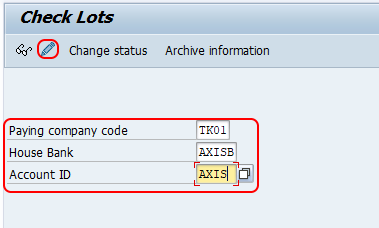
Step 2 : – On check lots screen, update the following details.
- Paying company code : – Update the paying company code key i.e. TK01
- House Bank : – Update the house bank i.e. AXISB
- Account Id : – Update the house bank account id i.e. AXIS
- Click on change button to create the check lots as per requirements.
Step 3 : – On maintain check lots screen, click on create button for maintaining number ranges for checks as per requirements of project.
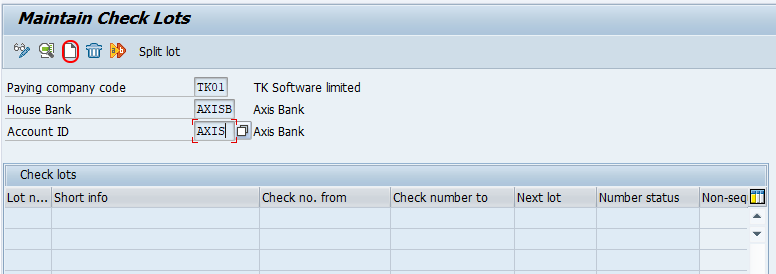
Note : – The check lot numbers are to be updated based on the bank issues checks.
A window open for creating the check lot number. Update the following details.
- Lot number : – Give the lot number
- Check Number : – Starting number of Check
- To : – Update the last number of check.
- Non Sequential : – It is optional to choose the non sequential check box, however to run the automatic payment program you need to select the non sequential check box.
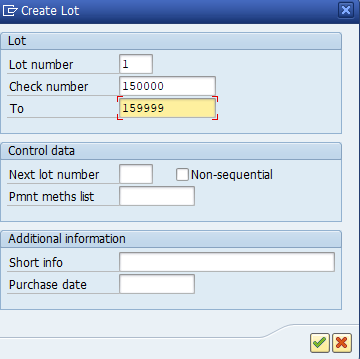
Press enter to continue.
Update the short information of check lot
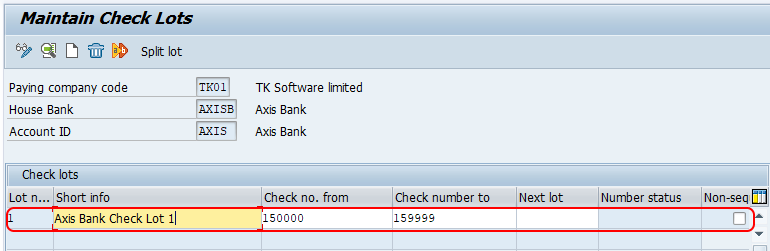
Click on save button and save the configured check lots in SAP.
Meaning of Important Fields in SAP Check Lot Maintenance
| Field in FCHI | Meaning | Example |
|---|---|---|
| Paying company code | Company code from which cheque payments are made. | TK01 |
| House bank | Bank key maintained in SAP for the company code. | AXISB |
| Account ID | Specific bank account under the selected house bank. | AXIS |
| Lot number | Internal identifier for the cheque lot. | 001 |
| Check number | First cheque number available in the lot. | 100001 |
| To | Last cheque number available in the lot. | 100100 |
| Short information | Description that helps users identify the cheque book or cheque range. | AXIS cheque book Jan |
Example of Check Number Range Setup in SAP FCHI
Assume the bank has issued a cheque book from cheque number 500001 to 500050 for company code TK01, house bank AXISB, and account ID AXIS. In FCHI, you can create one check lot with a start number of 500001 and an end number of 500050. SAP then uses this lot for cheque processing based on payment configuration and available cheque numbers.
| Company code | TK01 |
| House bank | AXISB |
| Account ID | AXIS |
| Lot number | 001 |
| Check number from | 500001 |
| Check number to | 500050 |
| Short information | AXIS cheque book 500001-500050 |
How Check Lots Are Used in SAP Outgoing Payments
After the check lot is created, SAP can assign cheque numbers during outgoing payment processing. Cheque payments may be created through manual payment transactions or through the automatic payment program, depending on how payment methods and forms are configured in the system.
A check lot does not replace payment method configuration. It only provides the cheque number range for the relevant paying company code, house bank, and account ID. The payment method, bank determination, forms, printer settings, and payment program settings must also be maintained correctly for cheque printing and cheque assignment.
Common Mistakes When Creating Check Lots in SAP
- Using a wrong account ID: The cheque lot must be created for the same bank account that will be used for payment.
- Entering cheque numbers that do not match bank stationery: Always compare the SAP number range with the physical cheque book or bank-provided cheque stock.
- Creating overlapping cheque ranges: Avoid assigning the same cheque number range to multiple lots for the same bank account.
- Leaving the description unclear: Use a short information text that clearly identifies the cheque book, bank, or range.
- Testing directly in production: Validate the setup in a test or quality system before maintaining production check lots.
Troubleshooting SAP Check Lot Issues in FCHI
| Issue | Likely reason | What to check |
|---|---|---|
| Check lot is not available during payment | Wrong company code, house bank, or account ID selected. | Compare payment bank details with the FCHI check lot. |
| Cheque number already used | The number range overlaps with an existing lot or previous cheque usage. | Review used cheque numbers and create a clean unused range. |
| Cheque printing does not work | Check lot exists, but payment forms or print settings may not be configured. | Review payment method, form, printer, and payment program settings. |
| User cannot save changes | Authorization or client setting issue. | Check user authorization and whether the client allows configuration changes. |
QA Checklist for SAP Check Lot Configuration
- Confirm that the paying company code, house bank, and account ID are correct.
- Verify that the cheque start number and end number match the bank-issued cheque range.
- Check that the cheque range does not overlap with another active lot.
- Use a clear short information text for audit and support reference.
- Test cheque assignment or cheque printing in the relevant payment process before production use.
SAP Check Lot FAQs
What is the T-code for check lot in SAP?
The T-code for maintaining check lots in SAP is FCHI. This transaction is used to define number ranges for checks for a paying company code, house bank, and account ID.
How do I create a check lot in SAP?
To create a check lot in SAP, execute transaction FCHI, enter the paying company code, house bank, and account ID, choose the change option, create a new lot, enter the cheque start and end numbers, add short information, and save the entry.
Why are check lots required in SAP payments?
Check lots are required because SAP needs a valid cheque number range before cheque numbers can be assigned to outgoing payments. Without the correct lot, cheque printing or cheque assignment may fail depending on the payment setup.
Can one house bank account have multiple check lots?
Yes, one house bank account can have multiple check lots when separate cheque books or cheque ranges are issued. Each lot should have a unique number range and a clear description.
Can a saved SAP check lot be changed later?
A check lot can be maintained later if the user has the required authorization, but changes should be made carefully. Do not change ranges that already contain used cheque numbers unless the business and audit impact has been reviewed.