 TutorialKart.com
How to Define Business Area in SAP
Business area in SAP is an organizational unit within accounting that can be classified as geography wise or product wise as per the requirements of an organization. Under business area, you can generate financial statements such as balance sheet and profit & loss account for internal reporting.
In SAP FI, business area reporting is normally used when management wants financial information across company codes by segment, branch, location, product line, or similar internal reporting dimension. This configuration is optional, so you should define business areas only when the organization has a clear reporting requirement.
- The definition of business area in SAP is optional.
- You can maintain number of business areas in SAP as per company needs.
- To post items in business area, you need to enter business area when you enter the business transactions.
- Examples of business areas are product lines, branches, etc.
Business Area in SAP FI: Meaning and Example
A business area represents a separate area of responsibility for internal accounting reports. For example, a company may want separate reporting for Bangalore, Hyderabad, Mumbai, and Vijayawada branches, or it may want reporting by product divisions such as electronics, services, and spare parts.
Business area is not a replacement for company code. A company code is the legal accounting entity, while a business area is generally used for internal financial reporting across one or more company codes. If business area is used in postings, the same business area key should be maintained consistently in relevant transactions and master data processes.
SAP Business Area Configuration Path and Transaction Code OX03
You can define business area in SAP through navigation method or transaction code.
- Navigation: – SPRO – Enterprise Structure – Definition – Financial Accounting – Define business area
- Transaction code: – OX03
Step 1) Enter transaction code “OX03” in the SAP command field and enter to continue.
Step 2) On change view “Business areas”: Overview screen, Click on “New Entries” button to create new business areas as per the requirements of company.
Step 3) On new entries of business areas screen, update the following details.
- Business Area: – Give the four digits key that identifies that business area in SAP.
- Description: – Update the descriptive text of business area.
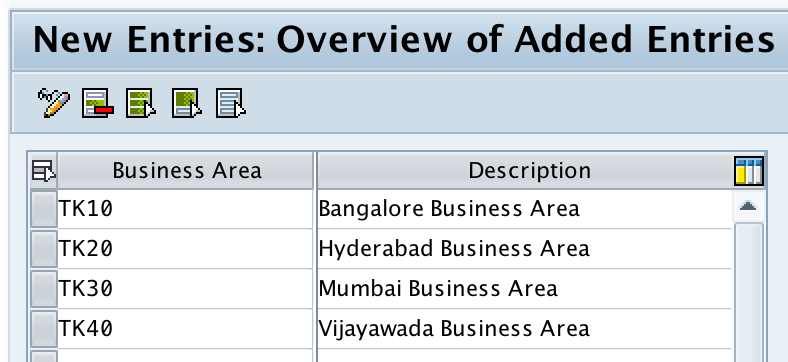
Scenario: We have defined four business areas as per geographical wise.
| Business Area | Description |
| TK10 | Bangalore Business Area |
| TK20 | Hyderabad Business Area |
| TK30 | Mumbai Business Area |
| TK40 | Vijayawada Business Area |
In this example, the four-character keys are easy to identify because they follow one naming pattern. In a real project, confirm the naming convention with the SAP FI consultant or project configuration standard before creating new keys.
Step 4) After updating the details, click on save button to save the configured business areas data.

Now you are prompted for customizing request number, choose request and save the details.
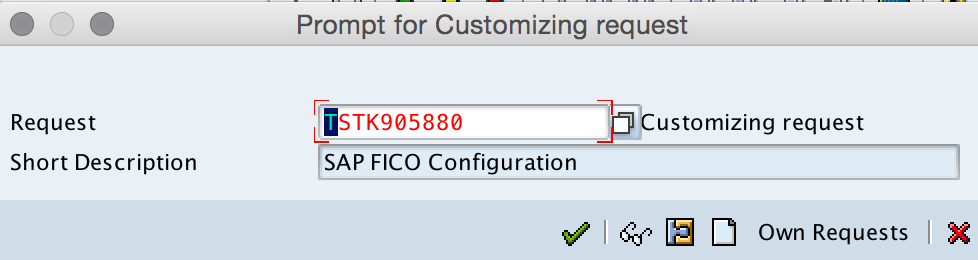
Successfully we have created new business areas in SAP.
Checks Before Saving a New Business Area in SAP
Before you save a new business area, review the configuration from a reporting and posting point of view. A business area key is small, but it can affect internal financial reports if users post transactions with the wrong value.
- Key length: Use a four-character alphanumeric key that follows the project naming convention.
- Description: Use a clear description that helps users recognize the branch, product line, or reporting segment.
- Reporting need: Create the business area only if business area level financial reporting is required.
- Transport request: Save the configuration in the correct customizing request so it can move through the landscape properly.
- Posting process: Confirm how the business area will be derived or entered during business transactions.
Maintain Consolidation Business Area in SAP
Consolidation business area specifies the central business segments within a company. If you maintain consolidated business area in SAP, it is mandatory to assign business areas to consolidated business areas.
In SAP S/4HANA and group reporting contexts, consolidation business area is used as a consolidation-related reporting dimension. The exact configuration path and available activities can vary based on system version, activated scope, and whether the organization uses classic FI configuration or SAP S/4HANA group reporting configuration.
- Navigation: – SPRO – Enterprise Structure – Definition – Financial Accounting – Maintain consolidation business area.
Click on “New Entries” button.

Enter consolidation business area key and its description.
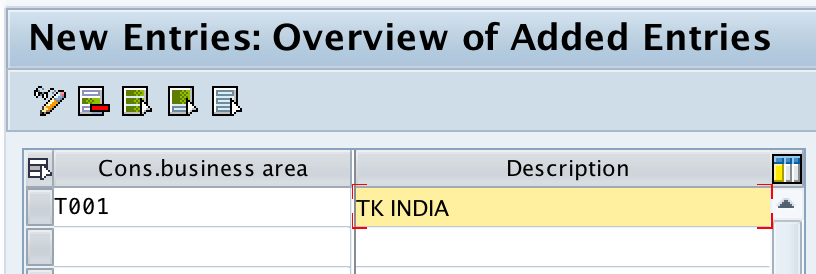
Click on save button and save the details.
Assign Business Area to Consolidation Business Area in SAP
After you define a consolidation business area, assign the relevant business areas to it if your configuration requires consolidation business area reporting. This assignment connects normal business area reporting with the consolidation business area used for consolidated reporting.
- Go to SPRO and open the SAP Reference IMG.
- Navigate to the Financial Accounting enterprise structure assignment activity for assigning business area to consolidation business area. In some systems, you can also search the IMG activity by its description.
- Choose the business area that you created in transaction OX03.
- Enter the consolidation business area key that should receive that business area.
- Save the assignment in the correct customizing request.
If the assignment activity is not available in your system, check the installed SAP product, release, activated business functions, and group reporting scope. In SAP S/4HANA Cloud or SAP S/4HANA group reporting, follow the relevant SAP Help configuration documentation for consolidation business area setup.
Reference: SAP Help documentation for consolidation business area.
Business Area vs Business Place in SAP
Business area and business place are different SAP concepts. A business area is mainly used for internal financial reporting, such as reporting by branch, region, or product division. A business place is generally used for statutory or tax-related reporting requirements in countries where business-place-level reporting is required.
| Point | Business Area | Business Place |
| Main use | Internal financial reporting | Statutory or tax reporting where applicable |
| Common examples | Branch, division, product line, region | Registered place of business or tax reporting location |
| Configuration purpose | Segment financial statements and internal reports | Support local legal, tax, or country-specific reporting |
Do not choose business area just because a separate location exists. First confirm whether the reporting requirement is internal management reporting, statutory reporting, tax reporting, or a combination of these requirements.
Common Issues While Defining Business Area in SAP
- Business area field is not visible during posting: Check field status settings, screen layout, and the relevant posting process.
- Wrong business area appears in reports: Review the source transaction, substitution rules, derivation logic, and user entry.
- Transport request is missing: Confirm that you are in a customizing client and have authorization to save configuration.
- Consolidation business area assignment is incomplete: Define the consolidation business area first, then maintain the assignment where the system requires it.
- Users confuse business area with company code: Explain that company code is the legal entity and business area is an internal reporting unit.
FAQ on Define Business Area in SAP
How do I define business area in SAP?
To define business area in SAP, use transaction code OX03 or go to SPRO – Enterprise Structure – Definition – Financial Accounting – Define business area. Choose New Entries, enter the four-character business area key and description, then save the configuration in a customizing request.
What is the use of business area in SAP FI?
Business area in SAP FI is used for internal financial reporting. It helps prepare reports such as profit and loss and balance sheet information by internal segment, branch, region, product line, or other management reporting area.
Is business area mandatory in SAP?
No. Business area configuration is optional. It should be used only when the organization needs business-area-level internal reporting and has a clear process for entering or deriving the business area during postings.
What is consolidation business area in SAP?
Consolidation business area is a consolidation-related reporting unit used to group or represent business areas for consolidated reporting. If consolidation business area is maintained, the relevant business areas must be assigned to the consolidation business area as required by the configuration.
What is the difference between business area and business place in SAP?
Business area is mainly used for internal financial reporting, while business place is generally used for statutory, tax, or country-specific reporting. The correct choice depends on the reporting requirement and local SAP configuration.
QA Checklist for SAP Business Area Configuration Tutorial
- Confirm that transaction code OX03 and the SPRO path for defining business area are shown clearly.
- Check that the tutorial explains business area as an optional SAP FI organizational unit for internal reporting.
- Verify that the example business area keys are four characters and have meaningful descriptions.
- Ensure the consolidation business area section explains that assignment is required when consolidation business area is used.
- Confirm that business area and business place are not described as the same configuration object.
Conclusion on Defining Business Area and Consolidation Business Area in SAP
In this SAP FICO tutorial, we learned how to define business area in SAP using transaction code OX03 and the SPRO navigation path. We also created sample business areas, saved them in a customizing request, maintained consolidation business area, and reviewed when business area assignment to consolidation business area is required. Business area should be configured only when it supports a clear internal reporting requirement.