 TutorialKart.com
What is Fiscal Year Variant in SAP
In SAP, a Fiscal Year Variant (FYV) defines how a financial year is divided into posting periods and special periods. It controls whether the fiscal year follows the calendar year, such as January to December, or a non-calendar year, such as April to March. The fiscal year variant is used by Financial Accounting to determine the correct posting period and fiscal year for accounting transactions.
A Fiscal year is also known as an accounting year. For example, if an accounting period runs from April 2017 to March 2018, many companies describe it as the financial year 2017-18. In SAP configuration, the fiscal year variant decides how this period is mapped to fiscal periods and year shift rules.
Fiscal Year Variant Meaning in SAP FICO Posting Periods
A fiscal year variant contains the period structure used for postings in SAP FICO. It normally includes regular posting periods and may also include special periods for year-end closing adjustments.
- A financial accounting year is called a fiscal year in SAP.
- A fiscal year usually consists of 12 normal posting periods when each month is treated as one period.
- Each period in a fiscal year is called a posting period.
- When business transactions are posted in SAP, the system assigns them to a fiscal year and posting period based on the fiscal year variant.
- Special periods are used for adjustment postings at year end, usually after normal period 12.
Calendar Year and Non-Calendar Fiscal Year Variant in SAP
SAP supports both calendar year and non-calendar fiscal year variants. The correct choice depends on the legal and business reporting period followed by the company.
| Fiscal Year Variant Type | Period Example | Typical Use |
| Calendar year fiscal year variant | January to December | Used when period 1 is January, period 2 is February, and so on. |
| Non-calendar fiscal year variant | April to March | Used when period 1 starts from a month other than January. |
| Year-dependent fiscal year variant | Periods can vary by year | Used when period dates are not constant for every calendar year. |
How Companies Maintain Fiscal Year Variant in SAP
- Indian companies commonly follow 12 posting periods from April to March with 4 special periods, for example fiscal year variant V3.
- US companies commonly follow 12 posting periods from January to December with 4 special periods, for example fiscal year variant K4.
- Some companies follow a fiscal year from July to June or October to September, depending on local accounting and reporting requirements.
- The fiscal year variant should be finalized before assigning it to company codes and before transaction postings begin.
OB29 Transaction Code to Maintain Fiscal Year Variant in SAP
You can create or maintain a fiscal year variant in SAP FICO by using transaction code OB29. This activity is part of Financial Accounting Global Settings.
Navigation: – SPRO — IMG — Financial Accounting — Financial Accounting Global Settings — Fiscal Year — Maintain Fiscal Year Variant. Transaction Code: – OB29
Step 1: Open OB29 Fiscal Year Variant Configuration in SAP
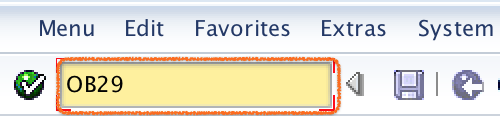
Enter T Code OB29 in the SAP command field and press Enter.
Step 2: Search V3 Fiscal Year Variant in OB29
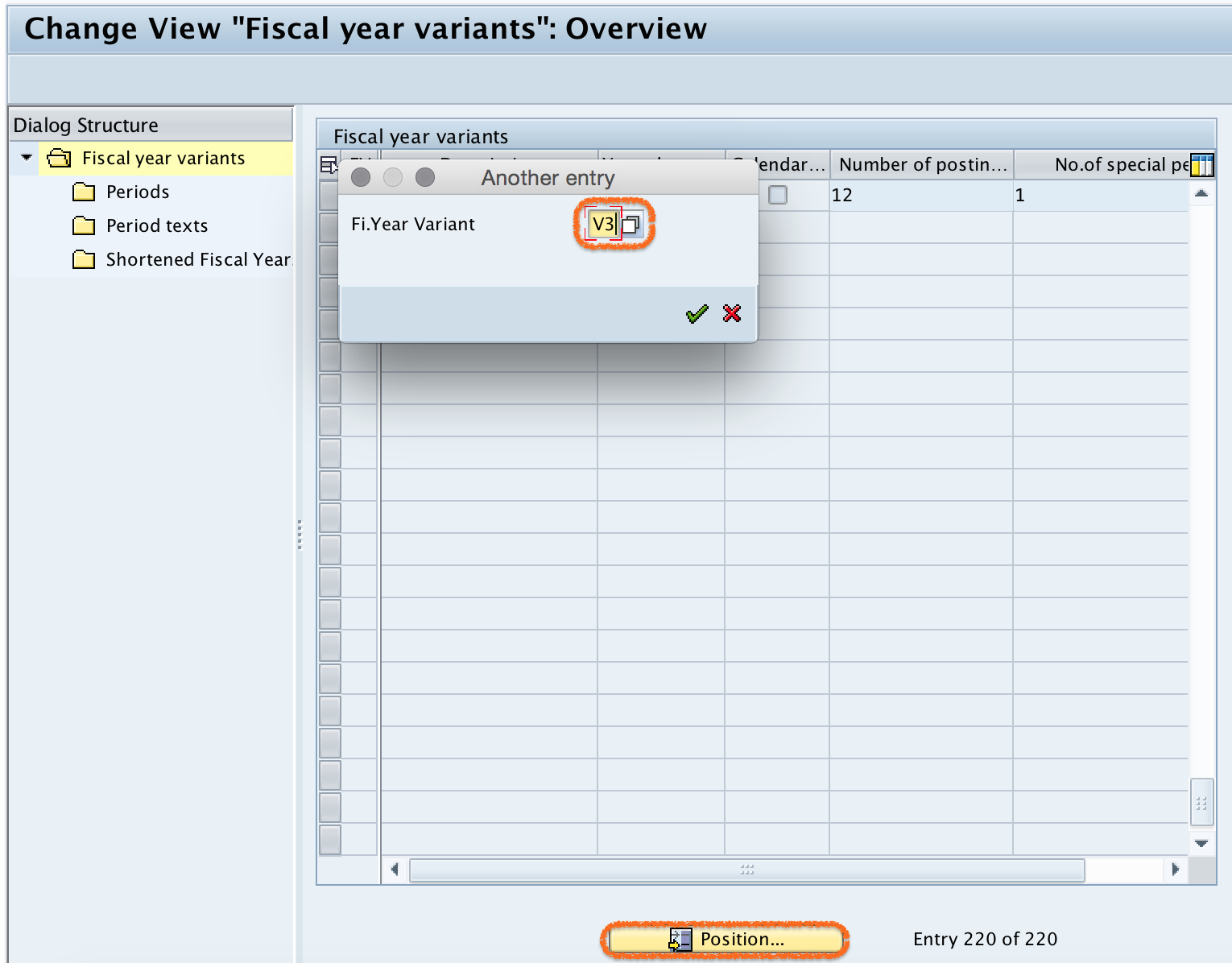
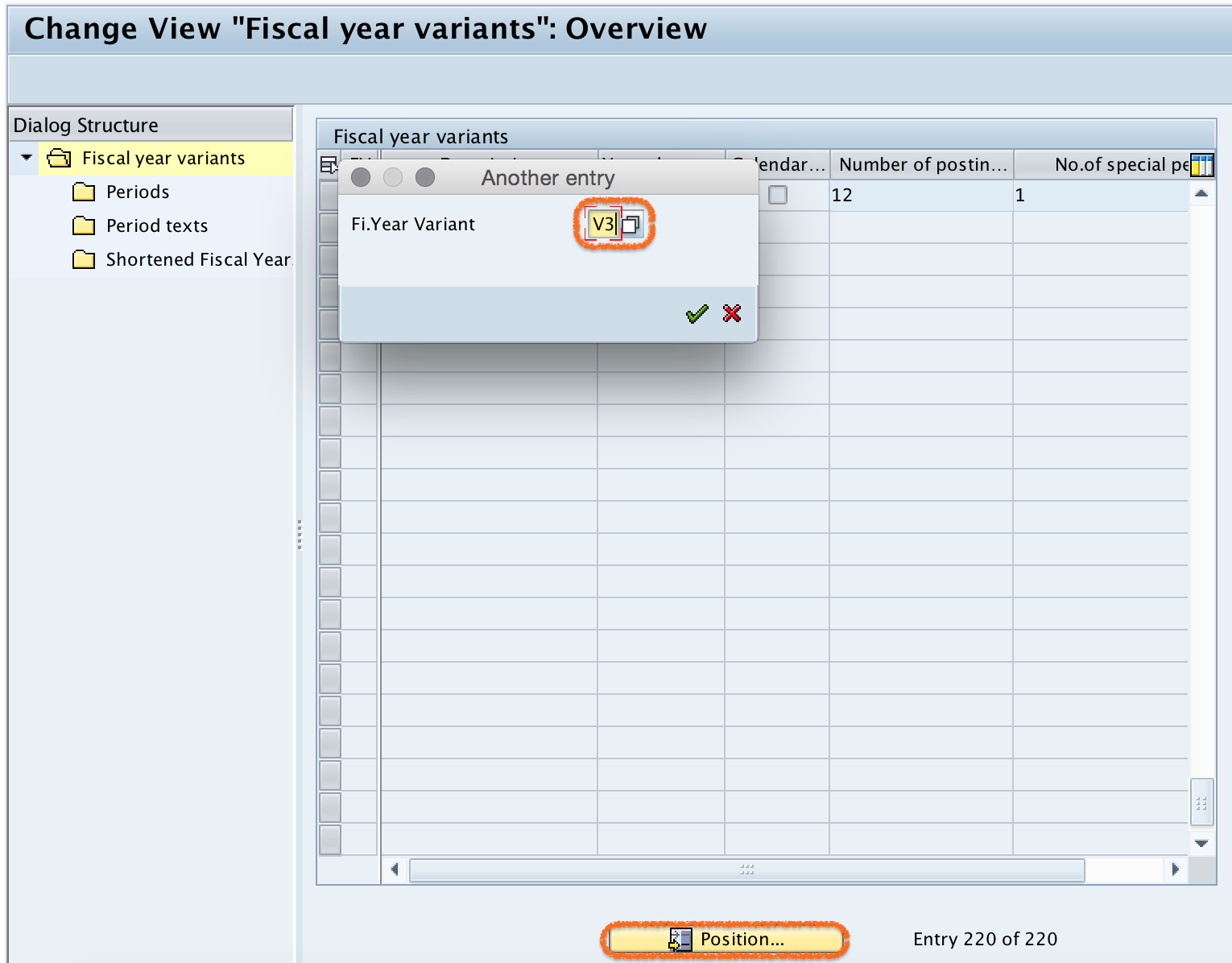
Select the Position button and enter fiscal year variant V3. Press Enter to continue. The system takes you to the fiscal year variant key in the overview list.
Step 3: Open Periods for V3 Fiscal Variant Key
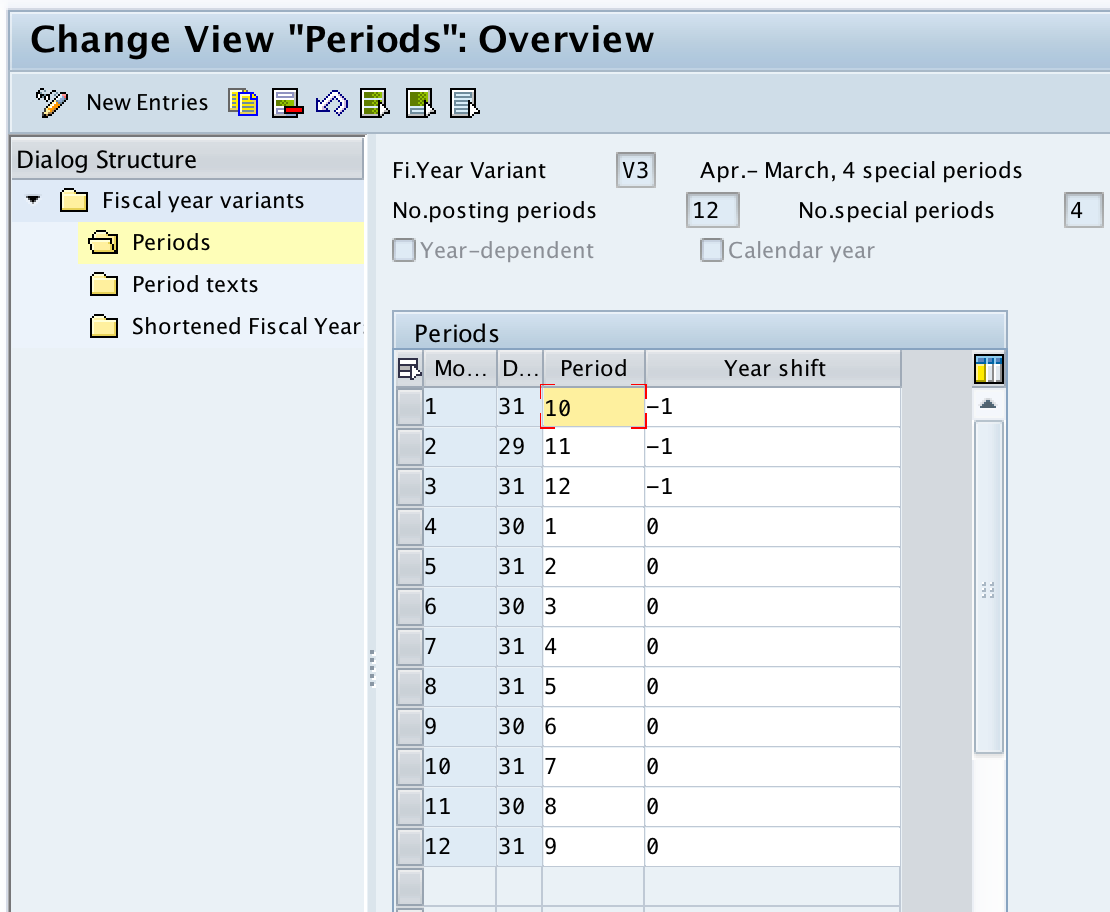
Select the V3 fiscal variant key and double click on the Periods folder. This screen shows how calendar months are mapped to fiscal periods.
Step 4: Check Month, Day, Period and Year Shift in Fiscal Year Variant
Now check the calendar month, calendar day, posting period, and year shift values. You can use an existing fiscal year variant in SAP if it matches the company requirement, or you can create a new variant when a different period structure is required.
How to Create New Fiscal Year Variant in SAP FICO
The following steps explain how to create a new fiscal year variant in SAP FICO. In this example, we create a non-calendar fiscal year variant where April is period 1 and March is period 12.
Step 1: Choose New Entries for Fiscal Year Variant Key
Go back to the main screen. On the change view Fiscal year variants overview screen, click the New Entries button to create a new fiscal year variant key as per organizational requirements.

Step 2: Enter Fiscal Year Variant Key, Periods and Special Periods
On the new entries screen, update the following details for the new fiscal year variant.
- FV: Enter the 2 digit alphanumeric key that identifies the fiscal year variant in SAP.
- Description: Update the descriptive text of FYV, for example April – March, 4 Spl periods.
- Number of posting periods: Update 12 because this fiscal year contains 12 normal posting periods.
- Number of special periods: Update 4 because this fiscal year variant contains 4 special posting periods for closing and adjustment entries.
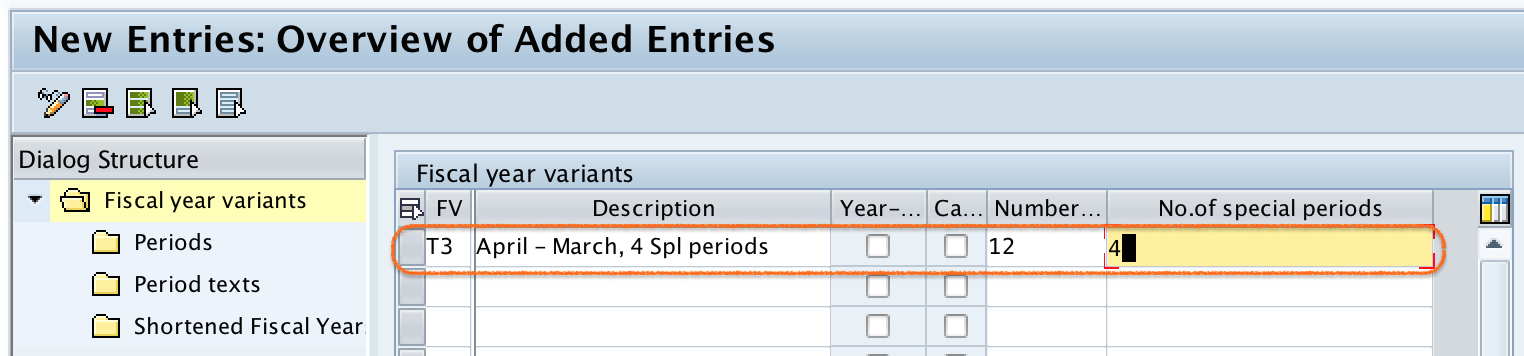
Click on the Save button to save the configured details.

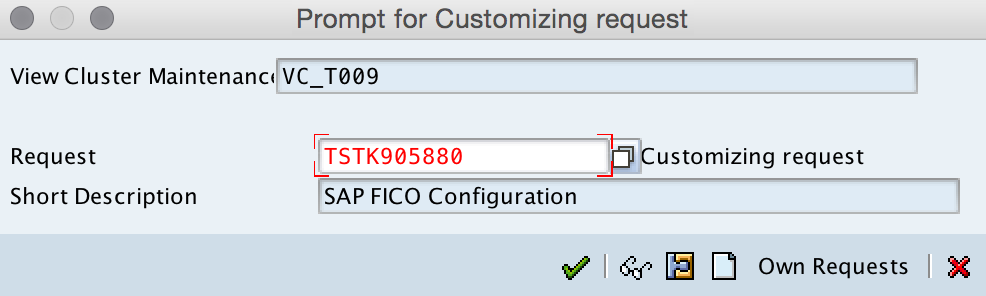
Now select your request number and press Enter to save the fiscal year variant in your customizing request.
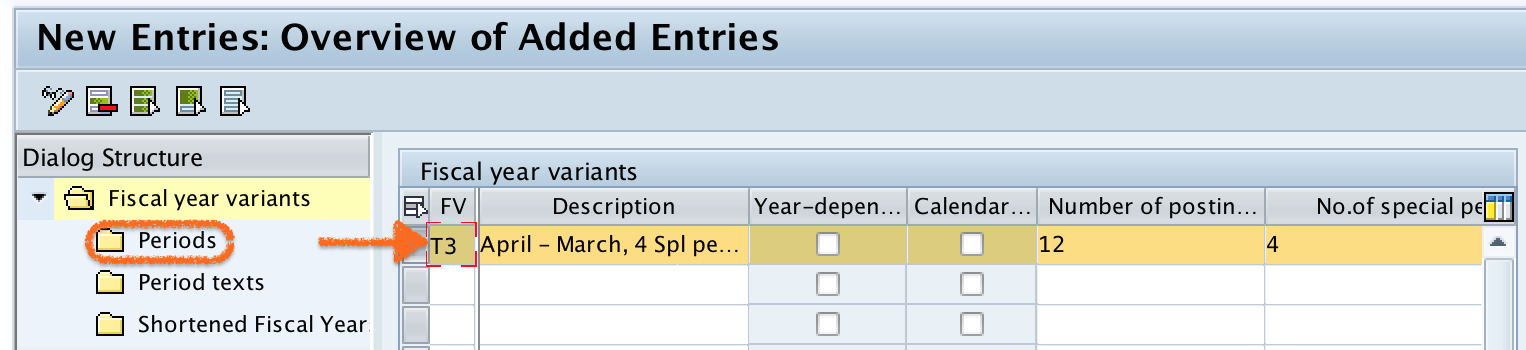
Step 3: Select Fiscal Variant Key T3 and Open Periods
Select fiscal variant key T3 and double click on the Periods folder. The periods folder is where the month, day, period, and year shift mapping is maintained.
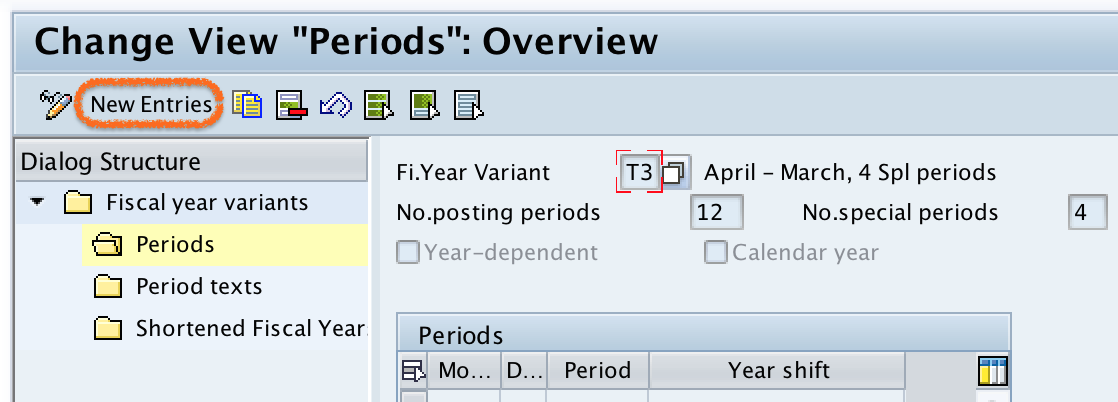
Step 4: Create Period Mapping for April to March Fiscal Year Variant
On the change view periods overview screen, click the New Entries button for maintaining period details such as calendar month, calendar date, period, and year shift.
Step 5: Maintain Month, Day, Period and Year Shift for Fiscal Year Variant
Now update the following details. This example is for an April to March fiscal year, where April is fiscal period 1 and March is fiscal period 12.
| Month | Day | Period | Year Shift |
| 1 | 31 | 10 | -1 |
| 2 | 28 | 11 | -1 |
| 3 | 31 | 12 | -1 |
| 4 | 30 | 1 | 0 |
| 5 | 31 | 2 | 0 |
| 6 | 30 | 3 | 0 |
| 7 | 31 | 4 | 0 |
| 8 | 31 | 5 | 0 |
| 9 | 30 | 6 | 0 |
| 10 | 31 | 7 | 0 |
| 11 | 30 | 8 | 0 |
| 12 | 31 | 9 | 0 |
Note: For the 4th month, April, we have updated the period as 1. For the 5th month, May, we have updated the period as 2. This mapping tells SAP to treat April to March as the fiscal year structure.
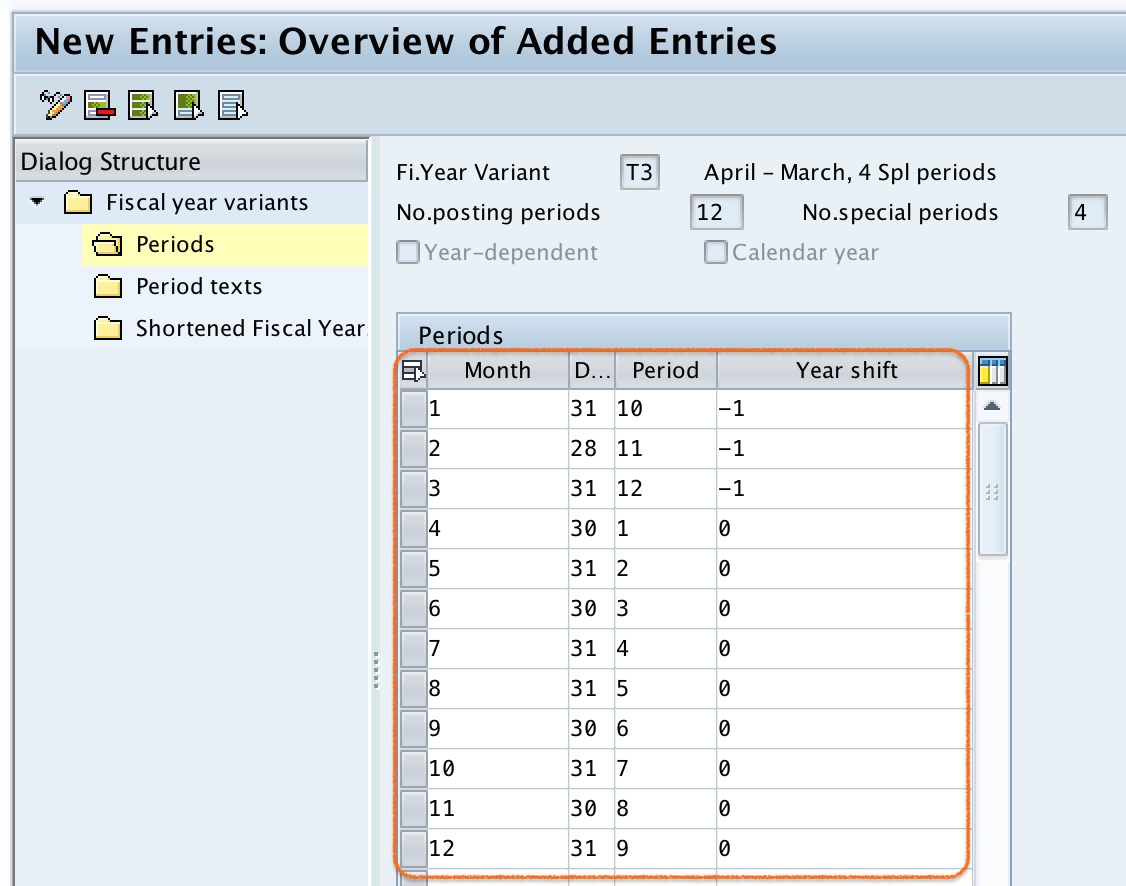
Click on the Save button and save the configured fiscal year details.
Why Year Shift is -1 for January to March in April-March Fiscal Year Variant
In an April to March fiscal year, January, February, and March belong to the closing part of the fiscal year that started in the previous calendar year. Therefore, the year shift is maintained as -1 for months 1, 2, and 3 in the example table.
For example, if the fiscal year starts in April 2017 and ends in March 2018, the calendar months January 2018, February 2018, and March 2018 still belong to fiscal year 2017 in this configuration approach. The year shift helps SAP determine this relationship correctly.
Why to Deselect Year Dependent and Calendar Year Check Box in OB29
- If you select the Year Dependent check box, the SAP system asks for the calendar year for which the conversion is applicable. If you specify 2015, then the conversion is applicable only for that particular year, and you need to define the conversion separately for other years. By deselecting the year-dependent check box, the conversion is applicable for all years.
- If you select the Calendar Year check box, the SAP system treats January as period 1, February as period 2, and so on. In this example, the requirement is that April should be period 1, May should be period 2, and so on. So, the calendar year check box must be deselected.
Assign Fiscal Year Variant to Company Code After OB29 Configuration
After creating or reviewing the fiscal year variant in OB29, the next configuration step is to assign the fiscal year variant to the relevant company code. This assignment is normally maintained with transaction code OB37. OB29 defines the fiscal year variant, while OB37 links that fiscal year variant to the company code.
Always confirm the fiscal year variant before transaction posting starts. Changing the fiscal year variant after postings exist can affect accounting periods, reporting, and closing activities.
Common Fiscal Year Variant Configuration Checks in SAP FICO
- Check whether the company follows a calendar year or non-calendar fiscal year.
- Verify the number of normal posting periods and special periods.
- Confirm whether the fiscal year variant should be year dependent or valid for all years.
- Review year shift values carefully for non-calendar fiscal year variants.
- Make sure the fiscal year variant is assigned to the correct company code using the relevant company code assignment configuration.
Successfully, we have created a new fiscal year variant in SAP FICO.
FAQ on Fiscal Year Variant in SAP FICO
What is fiscal year variant in SAP?
A fiscal year variant in SAP defines the number of posting periods, number of special periods, and period mapping for a fiscal year. It helps SAP determine the correct fiscal year and posting period for accounting transactions.
What is OB29 in SAP FICO?
OB29 is the SAP transaction code used to create, display, or maintain fiscal year variants. In OB29, you maintain settings such as posting periods, special periods, calendar year indicator, year-dependent indicator, and period mapping.
What is the difference between K4 and V3 fiscal year variant?
K4 is commonly used for a calendar year fiscal year from January to December. V3 is commonly used for a non-calendar fiscal year from April to March. The exact variant used in a project depends on the company code requirements and local accounting rules.
Why are special periods used in a fiscal year variant?
Special periods are used for year-end adjustment and closing entries. They allow companies to post closing adjustments separately from normal operating periods while still keeping them within the same fiscal year.
Which transaction code assigns fiscal year variant to company code?
Transaction code OB37 is used to assign a fiscal year variant to a company code. OB29 is used to maintain the fiscal year variant itself.
Editorial QA Checklist for SAP Fiscal Year Variant Tutorial
- Confirm that OB29 is explained as the transaction for maintaining fiscal year variants.
- Check that OB37 is mentioned only for assigning the fiscal year variant to company code.
- Verify that the April to March example maps April as period 1 and March as period 12.
- Review the year shift values for January, February, and March in the non-calendar fiscal year example.
- Ensure the tutorial distinguishes calendar year, non-calendar year, and year-dependent fiscal year variants clearly.