 TutorialKart.com
In this SAP FICO tutorials, you will learn how to define translation ratios for currency translation in SAP using transaction code OBBS. In our previous tutorial, we learned how to check exchange rate types in SAP.
Translation ratios tell SAP how an exchange rate is quoted between two currencies for a particular exchange rate type and valid-from date. The ratio is not the exchange rate itself. It is the unit relationship used when exchange rates are maintained, for example 1 USD to 1 INR or 100 JPY to 1 INR.
What translation ratios mean in SAP currency translation
A translation ratio is the conversion factor between the from currency and the to currency. SAP uses this factor together with the exchange rate type to interpret the exchange rate entered later. This is why translation ratios are normally configured once and kept stable across periods.
Translation ratios are maintained at SAP client level, not at company code level. A change can therefore affect all company codes that use the same client, currency pair, exchange rate type, and validity date.
Common conversion factors for SAP currency pairs
| Currency pair | Typical translation ratio | How to read the rate |
|---|---|---|
| USD : INR | 1 : 1 | Exchange rate is maintained for 1 USD against INR. |
| JPY : INR | 100 : 1 | Exchange rate is maintained for 100 JPY against INR. |
| GBP : INR | 1 : 1 | Exchange rate is maintained for 1 GBP against INR. |
| EUR : INR | 1 : 1 | Exchange rate is maintained for 1 EUR against INR. |
For currencies such as Japanese Yen, a 100:1 ratio is often easier to read and maintain because the exchange value for one unit may be very small. For example, if 100 JPY equals INR 58.00, the equivalent value for 1 JPY is INR 0.58. In SAP, the ratio makes the quotation clear before the exchange rate is used in postings, valuation, or reporting.
Before you maintain translation ratios in OBBS
Do not change existing production translation ratios without analysis. If a ratio is changed after exchange rates and accounting documents already exist, currency conversion results may no longer be consistent with earlier periods. For learning or testing, create new entries in a sandbox or training client rather than changing live configuration.
- Check the required exchange rate type first, such as M, B, or G.
- Confirm the from-currency and to-currency direction before creating the entry.
- Use a valid-from date that matches your configuration requirement.
- Coordinate changes with finance and SAP support teams if the system is already live.
Scenario: In this configuration example, we are going to define the following translation ratios for currency translation.
| ExRt | From | To | Valid from | Ratio(from) | Ratio(to) | Alt.ERT |
| G | USD | INR | 01.04.2016 | 1 | 1 | |
| B | USD | INR | 01.04.2016 | 1 | 1 | |
| M | USD | INR | 01.04.2016 | 1 | 1 |
OBBS path to define translation ratios for currency translation in SAP
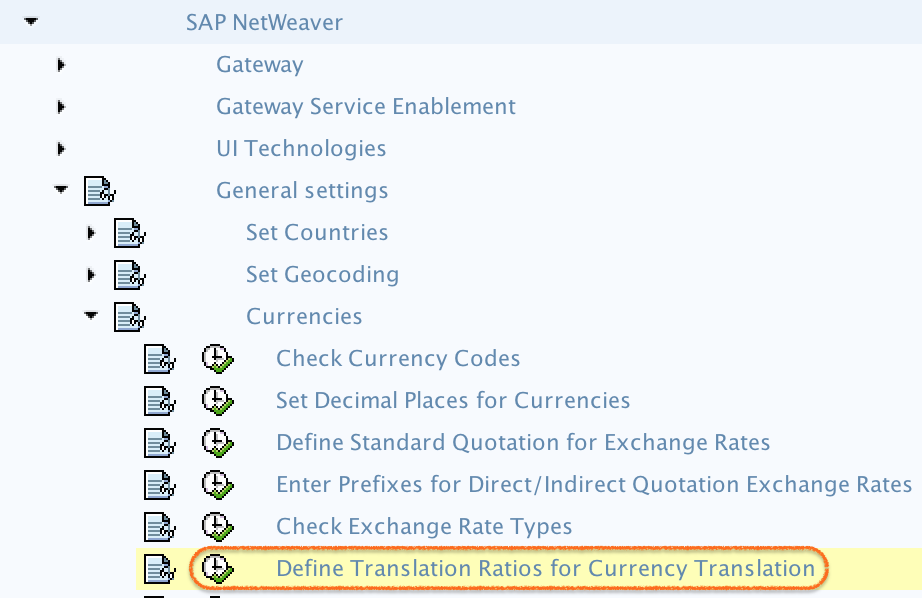
Step-by-step OBBS configuration for SAP currency translation ratios
Step 1) Enter SAP transaction code OBBS in the SAP command field and press Enter.

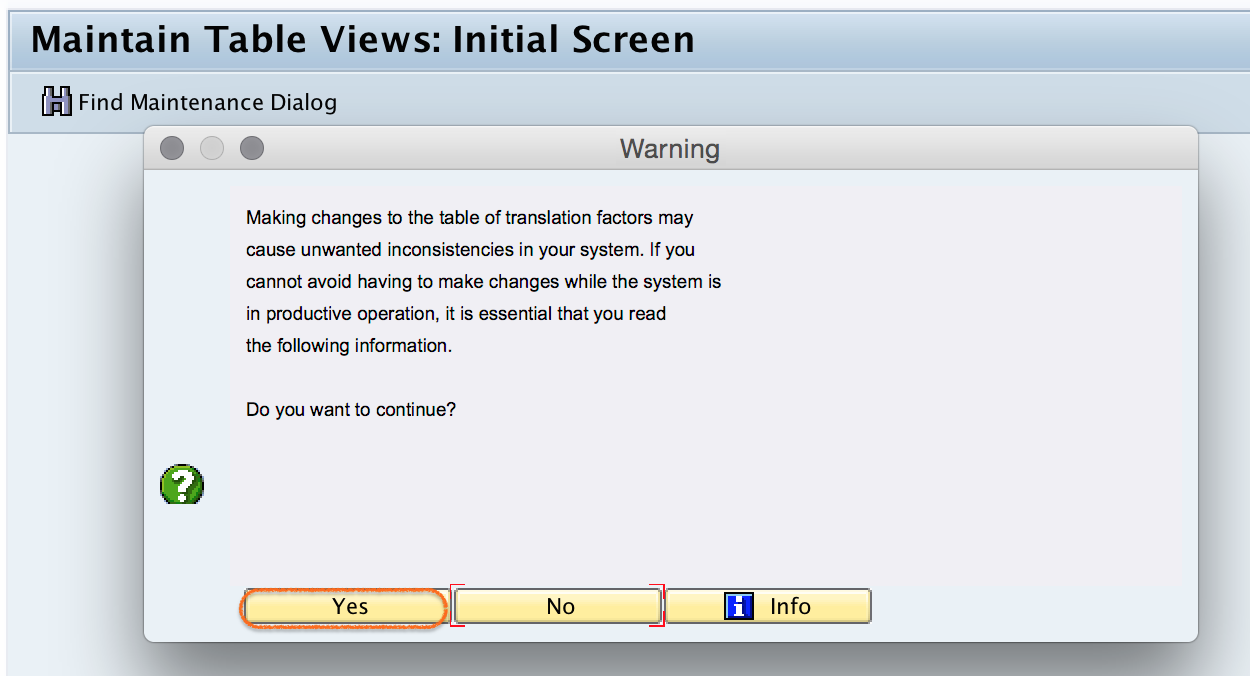
Step 2) SAP displays a warning message before allowing changes to currency translation ratios. Read the message carefully and click Yes only when you are working in the correct client and have approval to continue.
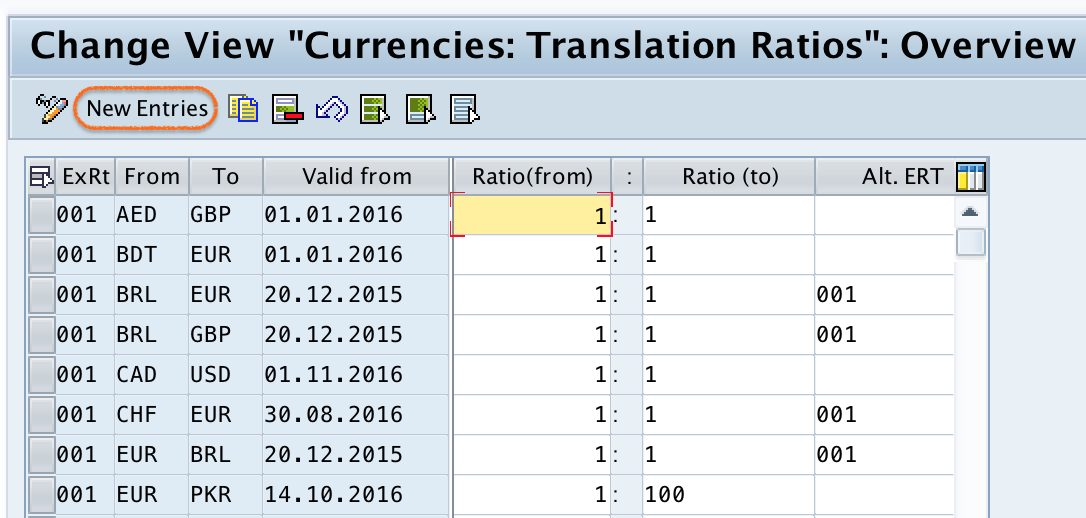
Step 3) On the Change View “Currency Translation Ratios”: Overview screen, review the existing entries. If the required currency pair, exchange rate type, and valid-from date already exist, do not create a duplicate. To define a new translation ratio, click New Entries.
Step 4) On the new entries overview screen, update the following details for the currency translation ratio.
| OBBS field | What to enter | Configuration note |
|---|---|---|
| ExRt | Exchange rate type, such as G, B, or M | Use the exchange rate type already defined for your business process. |
| From | Currency code to translate from | Example: USD. |
| To | Currency code to translate to | Example: INR. |
| Valid from | Date from which the ratio applies | Use the correct start date for the configuration entry. |
| Ratio (From) | From-currency quotation unit | Example: 1 for USD or 100 for JPY. |
| Ratio (To) | To-currency quotation unit | Usually 1 for the target currency in common direct quotations. |
| Alt. ERT | Alternative exchange rate type, if required | Leave blank unless your currency setup uses an alternative exchange rate type. |
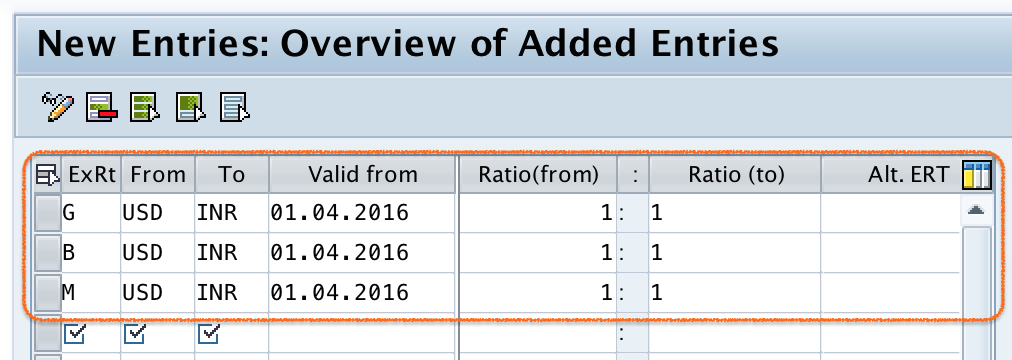
After updating all the required details, click the Save button and save the configured details in SAP systems. If the system prompts for a customizing request, assign the correct transport request according to your project process.
How SAP reads a translation ratio with an exchange rate
The translation ratio and the exchange rate work together. The ratio defines the quotation unit, and the exchange rate supplies the value for that unit. For a 1:1 USD to INR setup, an entered rate of 83.00 means 1 USD equals INR 83.00. For a 100:1 JPY to INR setup, an entered rate of 58.00 means 100 JPY equals INR 58.00.
| Currency pair | Ratio in OBBS | Exchange rate entered | Meaning |
|---|---|---|---|
| USD to INR | 1 : 1 | 83.00 | 1 USD = INR 83.00 |
| JPY to INR | 100 : 1 | 58.00 | 100 JPY = INR 58.00 |
This distinction is important when users compare OBBS with exchange rate maintenance. OBBS controls the ratio format, while exchange rate maintenance stores the actual rates for the selected exchange rate type, currency pair, and valid date.
Common OBBS mistakes in SAP currency translation ratio setup
- Changing a live ratio without impact analysis: This can affect future currency conversion results and create confusion when comparing old and new periods.
- Reversing the currency direction: USD to INR and INR to USD are different currency pair directions. Confirm the required direction before saving.
- Using the wrong exchange rate type: Maintain ratios for the exchange rate type actually used in postings, valuation, or reporting.
- Creating overlapping entries unnecessarily: Check existing valid-from dates before adding a new entry.
- Confusing ratio with rate: A 100:1 ratio does not mean the exchange rate is 100. It only defines the quotation unit.
Official SAP references for currency keys and exchange rate types
For additional background, refer to SAP documentation on currency keys, exchange rate types, and currency-related configuration. Useful official references include SAP Learning: currency keys and exchange rate types and SAP Help for SAP S/4HANA Cloud currency configuration.
FAQ on defining translation ratios for currency translation in SAP
What is the translation ratio in SAP?
The translation ratio in SAP is the quotation relationship between two currencies for an exchange rate type and valid-from date. It tells SAP whether the exchange rate is maintained for 1 unit, 100 units, or another unit of the from currency.
How do I maintain translation ratios in SAP?
You maintain translation ratios in SAP using transaction code OBBS or through the SPRO path for defining translation ratios for currency translation. Review existing entries first, click New Entries only when required, enter the exchange rate type, currency pair, valid-from date, and ratio values, and then save.
Is OBBS the same as maintaining exchange rates?
No. OBBS maintains the translation ratio or quotation unit. Exchange rate maintenance stores the actual exchange rate value. Both settings must be consistent for correct currency translation.
Why is JPY often maintained with a 100:1 translation ratio?
JPY is often maintained with a 100:1 ratio because the value of one JPY against another currency can be small. Maintaining the rate for 100 JPY makes the exchange rate easier to read and reduces decimal-heavy entries.
Can translation ratios be changed after SAP go-live?
Technically, authorized users can change translation ratios, but changing them after go-live should be avoided unless there is a controlled requirement and proper impact analysis. Existing exchange rates, reporting, and future postings may be affected.
Editorial QA checklist for SAP translation ratio configuration
- Does the tutorial clearly separate translation ratios in OBBS from actual exchange rate maintenance?
- Are all examples consistent with the same currency direction, such as USD to INR or JPY to INR?
- Does the guide warn that OBBS settings are client-level and should not be changed casually in production?
- Are the OBBS fields explained with practical notes for ExRt, From, To, Valid from, Ratio From, Ratio To, and Alt. ERT?
- Do the screenshots still match the transaction flow: OBBS, warning message, overview, new entries, and save?
Successfully, we have defined translation ratios for currency translation in SAP.